
Good selfie verification UX is a fraud control, not a cosmetic layer. Every instruction on the capture screen, every retry rule and every error message decides two things at once: whether a legitimate customer finishes, and whether a spoofed or injected image gets through. Teams that treat the flow as a design problem alone lose fraud detection signal, and teams that treat it as a security problem alone lose applicants. This guide covers how the flow works, where users fail, how to choose between active and passive liveness, what to do after a failed attempt, and which U.S. obligations apply.
TL;DR
- A sound selfie flow has three jobs in sequence: validate the document, confirm the selfie is a live human and not an attack, then match the face to the document portrait. Skipping any one of them is where fraud enters.
- Most abandonment is caused by capture problems (glare, blur, framing, camera permissions), so guided capture and plain-language error messages protect conversion and fraud detection together.
- Failure handling is a design decision with fraud consequences: limit retries, offer an alternative path, and treat repeated failures as a signal rather than only an inconvenience.
- In the U.S., build in accessibility (public entities face WCAG 2.1 AA duties), a documented biometric privacy assessment and a manual review step before any automated 1:N decline.
Table of Contents
- What a selfie verification flow actually asks of the user
- Where users actually fail, and how the interface can prevent it
- Active versus passive liveness: a UX and fraud tradeoff
- Match thresholds are a UX setting too
- Designing the failure path
- Accessibility is part of the spec
- Privacy and biometric data handling
- What a well-designed flow looks like end to end
- Perspective: the friction argument is usually backwards
- Choosing a vendor without losing control of the UX
- Where to go next
- FAQ
- Sources
What a selfie verification flow actually asks of the user
From the user’s side, the process is short. Federal identity proofing guidance describes it plainly: the person photographs their identity document, then submits a selfie or video that is compared with the ID photo. That is the entire visible experience, and it is why teams underestimate it. Behind those two steps sits a chain of checks, and each one can fail for reasons the user cannot see.
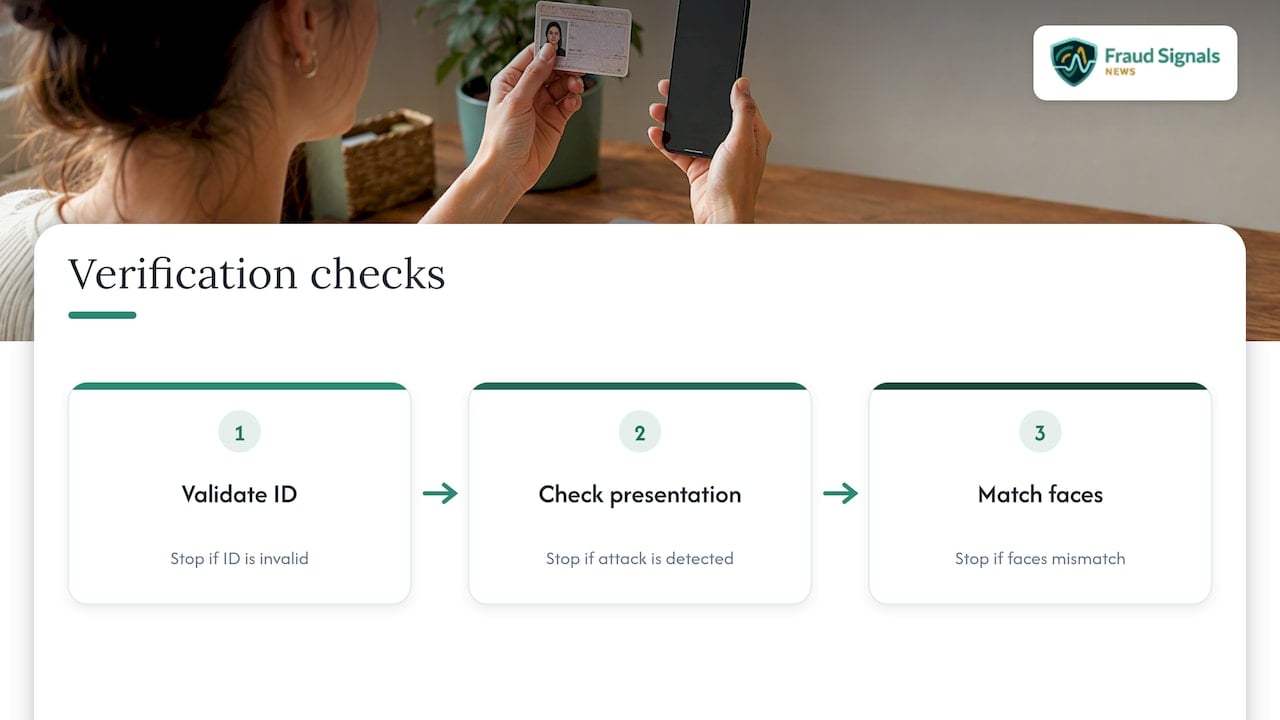
The Department of Homeland Security’s evaluation framework for remote identity validation lays out the chain: the system validates the ID, determines whether the biometric presentation is bona fide or an attack, then matches the selfie to the face on the document. The order matters for UX. A document that fails early should stop the flow before the user spends effort on a selfie that can never succeed. A selfie that fails liveness should not be silently passed to a face matcher that will happily compare a replayed image against the document portrait.
For a deeper explanation of the mechanics, see our overview of how selfie identity verification works and why it matters. Here, the focus is on the experience layer.
Why selfie-only flows fail
A selfie with no document check and no liveness control proves very little. An attacker can submit a stolen photo, a screen replay or a synthetic face, and the matcher has nothing authoritative to compare against. The UX consequence is that a “friction-free” selfie-only flow is usually friction-free for the wrong people. If a stakeholder asks you to remove the document step to lift conversion, the honest answer is that you are removing the reference the selfie is judged against.
Where users actually fail, and how the interface can prevent it
Most failures are mundane. Users hold the phone too far away, stand in front of a window, wear a hat, tilt the document so glare covers the portrait, or deny camera access on the first prompt and cannot find how to reverse it. None of these are fraud, yet each produces the same “verification failed” screen as an attack would.
The design principle is to catch the problem before submission, while the user can still fix it. In practice that means:
- Request camera permission with context. Explain on the screen before the system prompt why the camera is needed and what happens to the image. A user who taps “Don’t allow” by reflex needs a visible path to re-enable it, with device-specific steps.
- Use live framing guidance. An on-screen oval or document outline, with real-time prompts such as “move closer” or “reduce glare,” prevents bad frames from ever reaching the backend.
- Run quality checks on the device. Detect blur, low light and partial faces locally and ask for a retake immediately. Sending a poor image to a server and waiting for rejection costs the user time and costs you a session.
- Reject obviously invalid captures at once. A frame with no face, or more than one face, should not proceed. The eKYC engineering literature treats these as immediate rejections, and the same logic is sound in any pipeline, because a second face in frame is both a usability error and a potential coaching or substitution signal.
- Say what went wrong in plain language. “Photo too dark, try near a window or lamp” outperforms “Error 4012” every time, and it avoids teaching attackers which of your internal checks fired.
That last point is a genuine tension. Specific feedback helps honest users and can help attackers tune a presentation. The workable compromise is to be specific about capture conditions (light, framing, distance, glare) and vague about decision logic (liveness score, match score, risk rules).
Active versus passive liveness: a UX and fraud tradeoff
Liveness detection is the step that distinguishes a live person from a photo, mask or video replay. AWS describes it as separating a live human from fake representations such as photos, masks or video replays, which is the core of impersonation defense. How that check is presented to the user varies a great deal.
| Approach | What the user does | UX strengths | UX and security costs |
|---|---|---|---|
| Active liveness | Turns the head, blinks, smiles or follows an on-screen prompt | Visible, so users understand something is being checked; a challenge can resist simple static replays | More steps, more instructions to misunderstand, harder for users with limited mobility or motor control, longer completion time |
| Passive liveness | Looks at the camera for a moment | Fastest and least intrusive; fewer instructions to fail | Depends heavily on the quality of the vendor’s presentation attack detection and capture integrity controls |
| Hybrid or step-up | Passive by default, active challenge only when risk is elevated | Low friction for most users, extra assurance where it is needed | Requires a reliable risk signal to trigger the escalation; more engineering |
Our view is that passive liveness should be the default for mainstream consumer flows, with an active challenge reserved for step-up. Active prompts add friction and can exclude users who cannot comply with them, which is a design failure and, for some organizations, a legal one. But passive is not automatically safer or easier to defend. Its strength is entirely a function of the underlying detection and of whether the camera stream itself can be trusted. For a closer look at where these systems break, read our analysis of face liveness detection and where it fails.
Performance claims need a standard behind them
When a vendor says its liveness is “certified” or “99% accurate,” ask what was measured. NIST’s digital identity guidelines call for presentation attack detection that conforms to ISO/IEC 30107-3:2023 with defined impostor attack performance thresholds. DHS frames PAD results through two error rates: the Bona Fide Presentation Classification Error Rate (BPCER) and the Attack Presentation Classification Error Rate (APCER). The pairing is the UX story in numbers: BPCER is how often real users are wrongly rejected, APCER is how often attacks get through. Tightening one usually loosens the other, so a UX team should ask to see both, not just a headline accuracy figure.
Match thresholds are a UX setting too
The face comparison step has the same tradeoff. NIST SP 800-63A-4 sets a baseline for 1:1 biometric comparison of a false match rate of 1:10,000 or better and a false non-match rate of 1:100 or better. The false non-match rate is the one your customers feel: at 1:100, roughly one in a hundred genuine users could be rejected by the comparison alone, before any capture problem is counted. That is a reason to give rejected users a second route rather than a dead end.
If you want to read vendor and algorithm test data critically, our guide to reading NIST face test results explains which columns matter for onboarding.
Designing the failure path
The failure path is where selfie verification UX is usually weakest and where fraud teams get the most signal. Three principles apply.
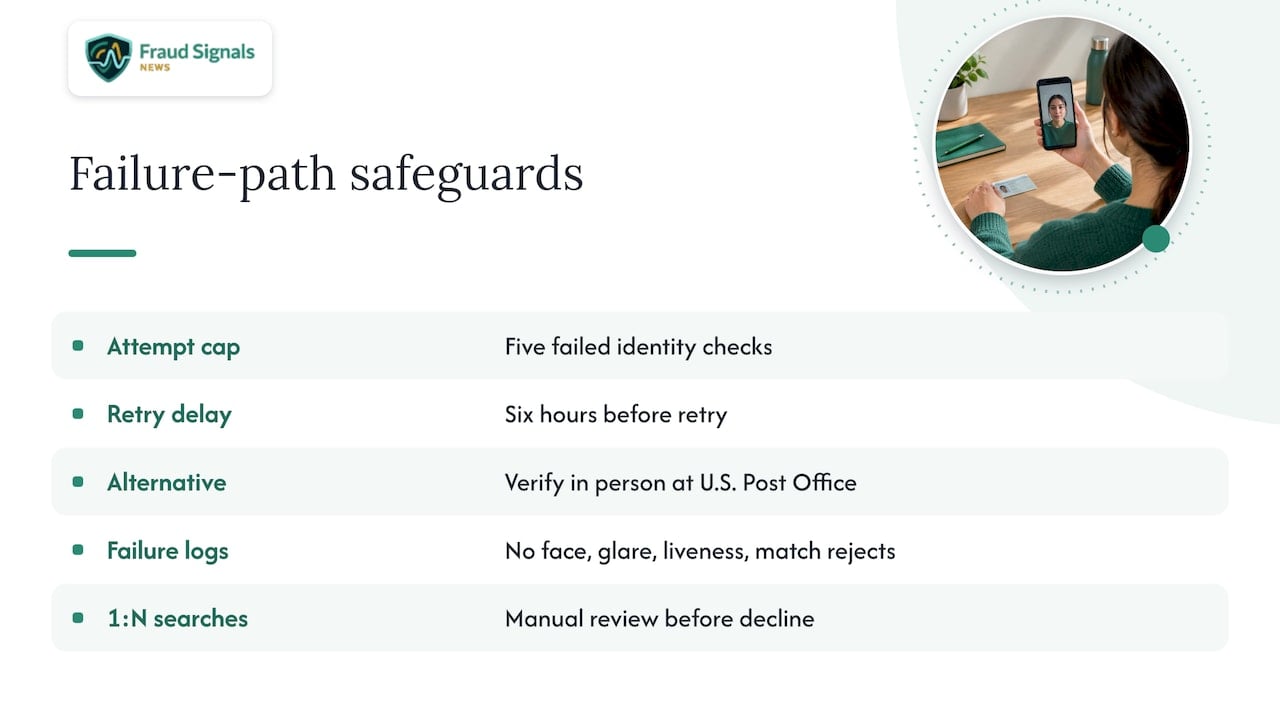
Limit attempts, but never trap the user. Login.gov, the federal sign-in service, publishes a useful pattern: after five failed identity checks, the user waits six hours before trying again or can verify in person at a U.S. Post Office. The lesson is structural, not the specific numbers: a hard cap slows brute-force attempts to find a face or document that passes, and an in-person or assisted alternative keeps legitimate users, including those whose faces or documents the system handles poorly, from being locked out.
Treat failures as data. DHS’s framework accounts for failure-to-capture rates and notes that failures can themselves be suspicious for fraud detection purposes. In practice, log why each attempt failed (no face, glare, liveness reject, match reject) and look at patterns by device, session and network. A user who fails capture twice on a cracked-lens phone is different from one who fails liveness six times across rotating devices.
Put a human in front of consequential declines. For 1:N biometric searches used for deduplication or fraud detection, NIST requires that providers perform a manual review before declining a user’s enrollment based on an automated match. Even where that rule does not formally bind you, it is a sensible design for any flow: automated matches against a watchlist or prior enrollments produce false positives, and the customer on the other end should not receive an unexplained denial.
Sync or async?
AWS notes that verification flows can be configured to run synchronously or asynchronously to balance security against speed. For UX, that means deciding which decisions need an instant answer (low-risk account opening) and which can say “we are reviewing your information” and follow up (high-value accounts, borderline scores). A clear status screen and an email or push update beat a spinner that runs for two minutes.
Accessibility is part of the spec
Selfie capture assumes a steady hand, good vision, a working front camera and an ability to follow timed prompts. Many users meet none or only some of those conditions. Offer on-screen text with audio cues, generous timeouts, a way to have a helper hold the device, and a non-selfie fallback path.
There is also a compliance angle. Under the Department of Justice’s ADA Title II rule, public entities serving populations of 50,000 or more must ensure their web content and mobile apps meet WCAG 2.1 Level A and AA success criteria as of April 2026. That covers state and local government portals that use selfie checks for benefits or licensing. Private institutions are not covered by that specific rule, but the criteria are a practical benchmark, and a flow that excludes users with disabilities is an operational risk whatever its legal status.
Privacy and biometric data handling
The image a user submits is sensitive personal data, and the interface should say so honestly. NIST SP 800-63A-4 requires credential service providers to conduct and document a privacy risk assessment covering biometrics, images and video used in identity proofing and fraud management, and to document policies for retaining, protecting and deleting that data. Translate this into the screen the user sees: what is collected, why, how long it is kept, and who can access it.
The FTC has long advised that companies using facial recognition build services with privacy by design, including reasonable security for collected images and biometric measurements. That guidance dates from 2012 and is not a statute, but it reflects the posture regulators and plaintiffs expect. Note that several states also regulate biometric data directly; confirm your obligations with counsel for each state in which you operate, because consent and retention rules differ.
What a well-designed flow looks like end to end
- Pre-flight screen. Explain the steps, estimated time (under two minutes is a reasonable design goal), and data use. Ask for camera permission here.
- Document capture. Guided framing, glare and blur detection, automatic capture when the frame is good, and a prompt to flip the document if a back-side check is needed.
- Document validation. Run in the background while the user continues. Fail early if the document is expired, unreadable or unsupported.
- Selfie and liveness. Passive by default, with a lighting and framing guide. Check that the camera stream is genuine, not an injected feed.
- Face match. Compare the live capture with the document portrait at a threshold set against your measured false non-match and false match rates.
- Decision. Approve, step up (active challenge, second document, manual review) or decline with a path to appeal or an alternative.
Step 4 deserves emphasis. A pristine on-screen experience means nothing if an attacker can replace the camera feed with a deepfake or recorded video. Our pieces on replay and injection fraud and on capture integrity against deepfake ID fraud explain why the device and stream controls sit alongside the visible UX, not behind it.
Perspective: the friction argument is usually backwards
We see the same pattern in nearly every conversation about selfie flows. A product team argues that security steps cost conversion, a fraud team argues that removing them costs money, and each side cites a number the other cannot check. Both are partly right and both are usually working from the wrong baseline.
Our position is that the largest source of avoidable friction is not the liveness check or the document scan. It is the bad capture experience around them: unclear framing, unexplained rejections, and dead-end failure screens. Those problems cost legitimate users and give fraud teams nothing in return, because a blurry image is not evidence of anything. Fixing them improves completion rate without loosening a single control.
The second pattern is the opposite error. Many institutions still lean on outdated checks, such as knowledge questions or SMS codes, because they feel easier for the customer, then discover that those methods are defeated at scale by credential stuffing and SIM swapping. A well-built selfie flow with document validation and liveness is usually less burdensome than the layered workarounds that grow around a weak front door. See why biometrics reduce bank fraud for the operational case.
The practical test we recommend: measure completion rate, BPCER-style wrongful rejection and attack success separately, by device type and by failure reason. If you only watch one blended conversion number, you will optimize toward whichever team shouts louder.
— Carlos Ochoa
Choosing a vendor without losing control of the UX
Most organizations buy rather than build, and the vendor’s SDK largely determines your capture experience. Before signing, evaluate on these criteria:
- Customizable capture UI. Can you control copy, branding, language and fallback paths, or are you locked into a fixed widget?
- Published test results. Ask for presentation attack detection testing against ISO/IEC 30107-3 and for both error rates, not just one.
- Injection and device defenses. Does the SDK detect virtual cameras and tampered streams?
- Fallback options. Is there a supported path for users who cannot or will not take a selfie?
- Data controls. Retention settings, deletion on request, and clear processor terms.
In the short list, established identity vendors such as Daon are a good option to evaluate alongside others, and our comparison of alternatives for identity verification sets out how to weigh them by type of deployment. Run your own pilot with your own user population, since results vary by demographics, device mix and document types.
Where to go next
Fraud Signals News covers the technology and the threats behind these design decisions, from liveness testing to deepfake ID attacks and compliance duties. If you are building or auditing a selfie flow, start with our guide to why biometrics satisfy compliance requirements, then browse the full archive on the Fraud Signals News homepage for the latest reporting on emerging attack techniques.
FAQ
What is selfie verification?
It is a check that compares a live selfie or short video with the portrait on a government-issued ID. The user photographs the document first, then submits the selfie, and the system confirms the face matches and that the capture is of a real person rather than a photo or replay.
Why does selfie verification keep failing for real users?
The usual causes are poor lighting, glare on the ID, a blurry or partial face, a second person in frame, or denied camera permission. Guided capture with on-device quality checks and specific retake prompts resolves most of these before the image is ever submitted.
Is passive liveness better than active liveness?
For most consumer flows, passive liveness gives the lower-friction experience and avoids prompts that some users cannot perform. Active challenges still make sense as a step-up when risk is elevated. Either way, the strength depends on tested presentation attack detection and on protecting the camera stream.
How many attempts should a user get?
There is no universal number, but a cap with a cooldown and an alternative route is a sound pattern. Login.gov, for example, applies a six-hour wait after five failed checks and offers in-person verification at a U.S. Post Office.
Do U.S. organizations need to disclose how they use selfie data?
Yes, in practice. NIST’s guidance calls for a documented privacy risk assessment covering biometrics, and the FTC recommends privacy by design with reasonable security for images. State biometric privacy laws can add specific consent and retention duties, so confirm requirements with counsel.
Sources
- Identity Proofing Best Practice, IDManagement.gov
- A Quantitative Framework for Evaluating Remote Identity Validation Systems, DHS
- NIST Special Publication 800-63A
- Digital Identity Guidelines: Identity Proofing and Enrollment, NIST SP 800-63A-4
- Identity Verification with Amazon Rekognition, AWS
- Identity proofing with a state-issued ID, Login.gov
- Title II Regulation Supplement, U.S. Department of Justice
- Facing Facts: Best Practices for Common Uses of Facial Recognition Technologies, FTC
Recommended

Onboarding Bot Detection: Stopping Automated Account Fraud

Biometric Performance Metrics: What to Measure and Trust