

Remote desktop fraud is any scheme in which a criminal gets a victim, or an organization, to hand over control of a device through legitimate remote access software, or breaks in through an exposed Remote Desktop Protocol (RDP) service, and then uses that control to steal money, credentials or data. The software is rarely malicious. The deception around it is, and that is why antivirus tools tend to stay silent while an account is being emptied. Consumers meet the scam as a fake tech support call or a phony refund. Businesses meet it as an unmonitored remote management tool or an RDP port open to the internet.
TL;DR
- Remote desktop fraud abuses real tools such as AnyDesk, ScreenConnect and RDP, so the software itself seldom triggers an alert; the social engineering around it is the attack.
- Legitimate tech support does not make unsolicited contact, and any unexpected request for remote access, especially paired with urgency or a request to move money, should end the conversation.
- If access was already granted: disconnect from the internet, close and uninstall the remote tool, call the bank at once, change passwords from a different device, and report to the FTC or FBI.
- Organizations should allowlist approved remote management tools, close unused RDP ports, enforce MFA and account lockouts, and log RDP login attempts, as CISA advises.
- Losses are large: the FBI’s IC3 attributed more than $2.1 billion in 2025 losses to tech and customer support scams alone.
Table of Contents
- What remote desktop fraud actually is
- How the schemes unfold
- Why the tools evade detection
- Warning signs worth acting on
- The scale of the problem
- What to do right after granting access
- Prevention for individuals
- Controls for banks and businesses
- Perspective: the session is the new perimeter
- Where to go next
- FAQ
- Sources
What remote desktop fraud actually is
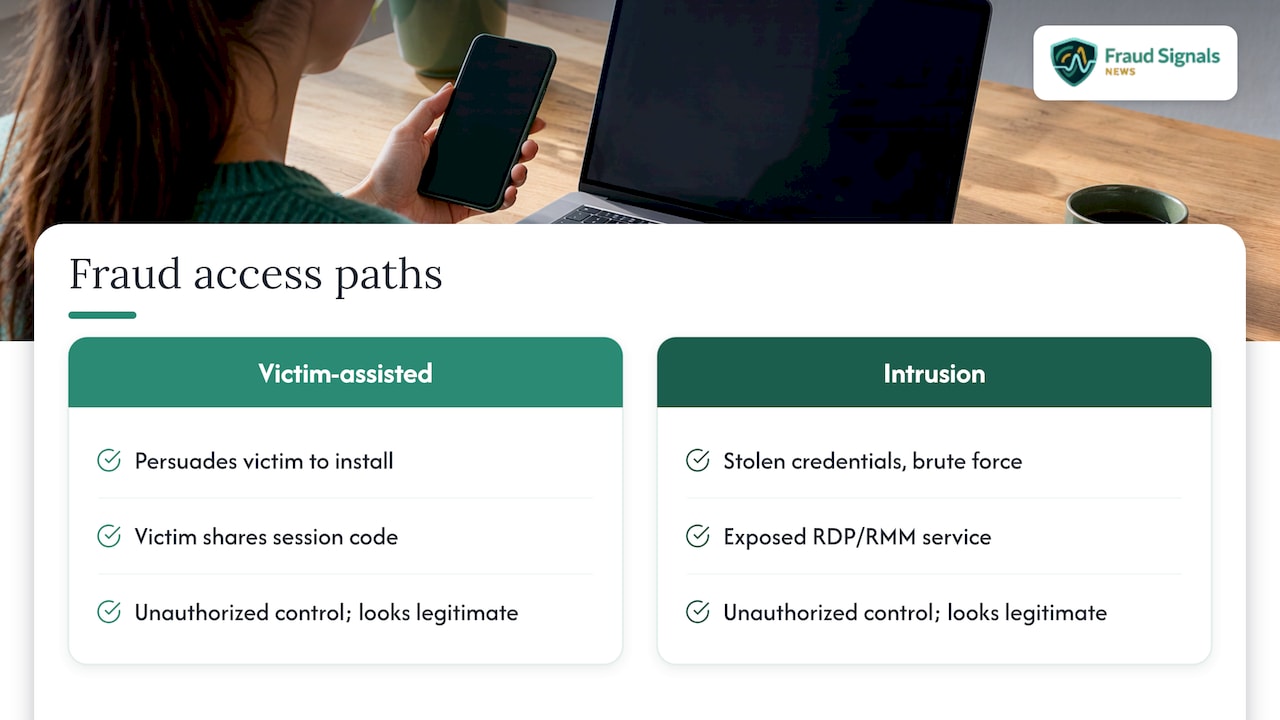
The term covers two related problems that share a mechanism: someone who should not control a machine ends up controlling it, and the session looks legitimate from the outside.
The first is victim-assisted fraud. The criminal never breaks anything. They persuade a person to install free remote desktop software and read out a session code. According to the FBI’s Boston Division, fraudsters pose as support representatives from reputable technology companies and may call, email or text, sometimes convincing victims that their financial accounts are compromised and that funds must be moved. Once connected, they can monitor and manipulate the computer, including opening virtual currency accounts to liquidate the victim’s genuine bank accounts.
The second is intrusion fraud, where attackers use stolen credentials, brute force or an exposed service to reach RDP or a remote monitoring and management (RMM) tool on a business network. CISA notes that malicious actors are known to leverage legitimate RMM and remote desktop software as backdoors for persistence and for command and control, and that they can abuse any legitimate RMM product, not only the two named in a given campaign (CISA advisory AA23-025A).
How it differs from legitimate remote support
Legitimate remote support exists and is routine: IT departments, managed service providers and software vendors use it daily. The difference is not the tool but the direction of contact and the surrounding context. The FBI states plainly that legitimate customer and tech support representatives will never initiate unsolicited contact with customers. A session you requested, through a channel you found yourself, with a provider you can verify, is support. A session that begins with a call, text or pop-up you did not ask for is the opening move of a scam.
How the schemes unfold
The scripts vary, but a few patterns account for most of what fraud teams and consumers see.
- The fake virus alert. A browser pop-up or locked screen claims the device is infected and displays a phone number. The victim calls, a “technician” asks for remote access, and then “finds” multiple viruses, malware or scareware that can be removed for a fee. The IC3’s tech support scam alert describes fees collected by debit or credit card, electronic check, wire transfer or prepaid card, and notes that on mobile devices the scammer often tells the victim to connect the phone to a computer to be fixed.
- The fake subscription renewal. A message claims an automatic renewal for a security or support service from a well-known brand has been charged. According to the FTC, anyone who calls the number in the message is asked for remote access, taken to a spoofed website and told to enter bank or card details to process a refund. The FTC’s alert on fake Geek Squad renewals adds that once a scammer has remote access, they can install spyware, steal online banking credentials and drain accounts.
- The inflated refund trick. In the October 2022 campaign analyzed by CISA, phishing emails led victims to download legitimate RMM software, namely ScreenConnect (now ConnectWise Control) and AnyDesk. The actors connected to the victim’s system, enticed the victim to log in to their bank account while the session stayed open, and then altered the account summary on screen to show a falsely inflated refund. The victim, believing they had been overpaid, was pressed to send money back, which was real money from the real account.
- The bank impersonation hand-off. A caller posing as a bank fraud department says the account is under attack and that a “secure session” is needed to move funds to a safe account. This is the version retail banks feel most directly, and it overlaps with the patterns in our retail banking fraud schemes guide.
- The exposed RDP server. On the business side, attackers scan for reachable RDP, guess or buy credentials, and log in as if they were an employee. CISA’s ransomware data breach fact sheet says threat actors often gain initial access through exposed and poorly secured remote services before propagating ransomware.
Why the tools evade detection
The uncomfortable part for defenders is that none of this requires malware. CISA reports that in the 2022 campaign, the actors downloaded AnyDesk and ScreenConnect as self-contained, portable executables configured to connect to their own RMM server. That approach bypassed both administrative privilege requirements and software management control policies, and the advisory observes that RMM software use generally does not trigger antivirus or antimalware defenses (CISA).
This is the structural weakness in controls built to recognize known-bad files. A signed, reputable binary running a session to a vendor’s relay looks, to endpoint tooling, like an administrator doing their job. Detection has to shift from “is this file malicious” to “is this tool authorized, and is this session expected.” Banks that still rely on static rules and one-time passcodes face the same gap on the transaction side, which we examine in why outdated fraud prevention fails in financial services.
There is also a payment-side signature. The FTC points out that scammers push for gift cards, wire transfers, bank transfers, cryptocurrency or payment apps because these work like cash: once the money is sent, it is hard to get back. A session in which a customer, under remote control or guidance, suddenly sets up a new crypto account or a first-time wire is exactly the behavioral anomaly a bank can catch.
Warning signs worth acting on
The FTC lists the core indicators: a bogus computer warning, an unexpected call or text from someone claiming to be tech support, a request for remote access, and pressure or scare tactics. Several more can be drawn from the official guidance.
- Unsolicited contact. Weill Cornell’s IT security team notes that legitimate tech companies will not contact you by phone, email or text to say there is a problem with your computer.
- A pop-up with a phone number. Real security warnings never ask you to call a number, according to the same source.
- Manufactured urgency. The IC3 says subjects urge victims to act fast to protect the device, creating fear that produces immediate action, and advises resisting the pressure.
- Being told to stay on the line. A caller who wants you to keep the session open while you log in to a bank, or who tells you not to speak to anyone at the branch, is isolating you from the people who could stop the transfer.
- Unusual payment methods. Any demand for gift cards, wires, crypto or payment apps, per the FTC.
- Callback numbers supplied by the sender. The FTC advises that if a message might be real, contact the company using a number you know to be genuine, not the one in the message.
The OCC’s Safe Money guide also lists remote access requests made under the guise of fixing a computer problem as a key method in online and digital scams.
The scale of the problem
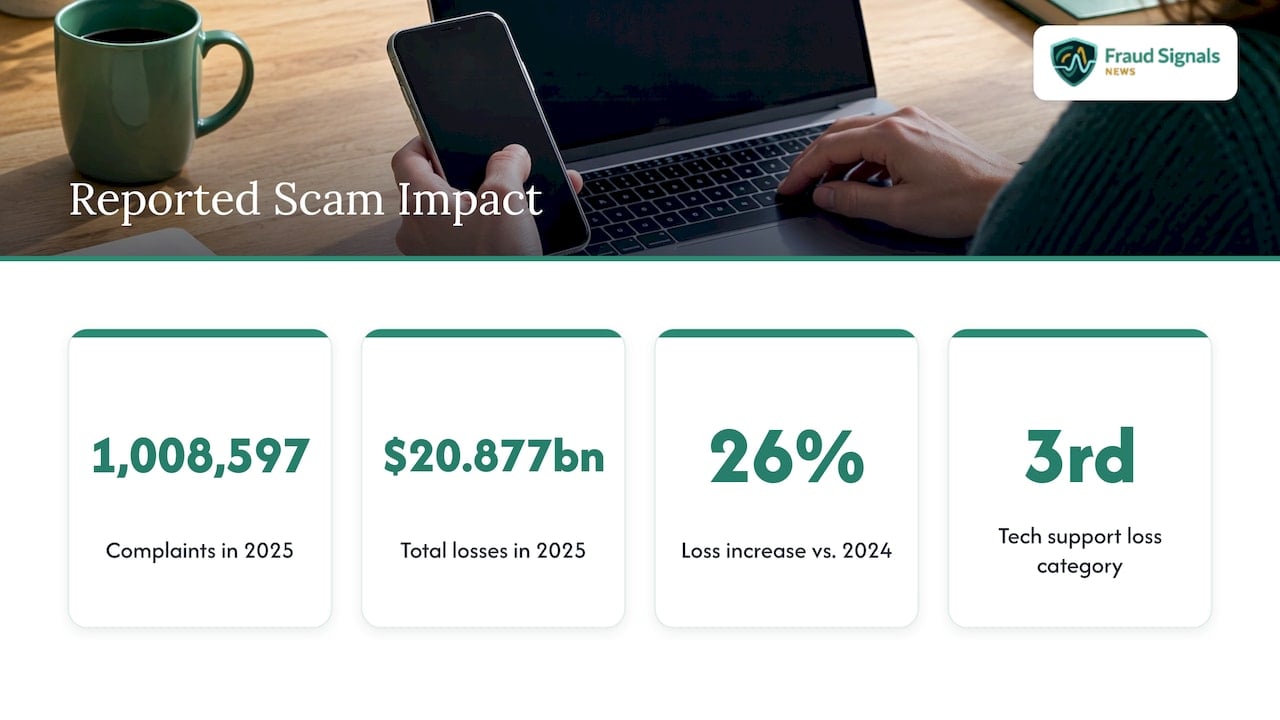
The most recent national figures are large. The FBI’s 2025 IC3 Annual Report recorded 1,008,597 complaints and $20.877 billion in total losses, a 26% increase on 2024. Tech and customer support scams accounted for $2,134,675,818 in reported losses, the third-highest loss category in the report.
Older data shows who bears the cost. The FBI’s Boston Division reported that in 2021, 23,903 people nationwide lost more than $347 million to tech support scams, a 137% rise in losses from the previous year. Almost 60% of victims were over 60 and they suffered 68% of the losses.
Complaint counts alone understate the picture. The FTC’s 2024 data, as reported by The Register, ranked tech support scams 22nd by volume with 24,311 complaints, or 0.38 percent of reports, yet the dollar losses per case are far higher than for many more common scam types. Enforcement continues as well: the FTC’s Nexway refund program sent a second round of payments in June 2025 to people who lost money to a scheme operating under names including Tech Live Connect, following an earlier round in February 2024.
What to do right after granting access
Speed matters more than anything else. The sequence below combines the guidance from Weill Cornell’s IT security team, Microsoft’s support advice as summarized in the same source, and the IC3.
- Disconnect from the internet. Turn off Wi-Fi or unplug the Ethernet cable. On a phone, switch on airplane mode.
- End the session and remove the software. Close any active remote sessions and uninstall the remote management tool, along with any other application the caller asked you to install.
- Call your bank immediately. Report fraudulent transfers and request chargebacks where applicable. The IC3 advises contacting financial institutions to place protection on accounts and then monitoring accounts and personal information for suspicious activity. If you paid by credit card, ask the issuer to contest the charge.
- Change passwords from a different device. Use a separate, trusted device for banking, email and any sensitive accounts. Changing them from the compromised machine hands the new credentials straight back to the intruder.
- Clean the device. Microsoft advises considering a device reset, running a full scan with Windows Security and applying all security updates.
- Report it. Go to ReportFraud.ftc.gov or call 877-FTC-HELP (877-438-4338), as the OCC’s guide notes. The FTC says it uses scam reports to build cases against scammers. The FBI’s IC3 and local law enforcement also accept reports.
If the trigger was a pop-up or locked screen without a live session, the IC3 says shutting down the device and waiting a short time before restarting usually removes it.
Prevention for individuals
The rule is short: allow remote access only when you are certain you are dealing with a legitimate support service that you contacted yourself. Verify who is reaching out through a number or website you find independently. End any conversation in which you feel rushed or threatened. A real provider will accommodate a customer who hangs up and calls back.
Families can add a practical layer. Because older adults carry a disproportionate share of losses in the FBI’s data, it helps to agree in advance that nobody installs a screen-sharing app at a stranger’s request without talking to a relative or the bank first. For wider habits that shrink the attack surface, see our guide to ways to reduce identity fraud exposure.
Controls for banks and businesses
Organizations face both the customer-assisted scam and direct RDP and RMM abuse. The CISA, NSA and MS-ISAC guidance and the CISA ransomware fact sheet give a workable baseline:
| Control | What it addresses | Source guidance |
|---|---|---|
| Audit remote access tools and their execution logs | Unknown or unauthorized RMM installs | CISA AA23-025A |
| Application controls with RMM allowlisting | Portable executables run without installation | CISA AA23-025A |
| Require approved RMM use only from inside the network via VPN or VDI | Sessions to attacker-controlled relays | CISA AA23-025A |
| Block inbound and outbound connections on common RMM ports and protocols at the perimeter | Command and control traffic | CISA AA23-025A |
| Audit for systems using RDP and close unused RDP ports | Exposed attack surface | CISA fact sheet |
| Enforce account lockouts, apply MFA, log RDP login attempts | Brute force and credential reuse | CISA fact sheet |
| Phishing training and exercises | The lure that starts the chain | CISA AA23-025A |
The advisory also calls for detecting RMM software that is loaded only in memory, which matters because a portable tool never shows up in an installed-software inventory.
The customer-side gap
None of these controls protects a customer who is on the phone with a convincing impersonator. For banks and fintechs, the answer sits in the session and the transaction. Step-up verification on new payees, first-time crypto or wire activity, and abrupt changes in device or session behavior can interrupt a scam mid-flight. Strong, liveness-checked authentication also helps because it ties a high-risk action to the actual account holder rather than to whoever holds the screen; our analysis of why biometrics reduce bank fraud and mobile banking fraud risk covers how those layers fit together. Contact center exposure is a related front, discussed in why call center fraud risks increase.
Perspective: the session is the new perimeter
We have watched institutions spend years hardening the login, only to see losses move to whatever happens after it. Remote desktop fraud is the clearest example. The customer authenticates correctly, the device is genuine, the credentials are valid, and the money still leaves, because someone else is steering.
That is why we argue that verification cannot be a single event at the front door. It has to follow the risk: confirming the person at the moment a new payee is added, a limit is raised or an account is opened, and treating a live remote session as a signal rather than as noise. Static passwords and passcodes that a victim can read aloud to a caller are obsolete against this threat.
Our coverage focuses on the tools that close that gap, including liveness detection, biometric identification and capture integrity, and on the operational frameworks fraud leaders need to measure whether the controls are working. The institutions that treat remote access abuse as an identity problem, and not only an endpoint problem, will be the ones that stop it earlier.
Carlos Ochoa
Where to go next
Fraud Signals News covers the technologies and tactics that sit behind schemes like this one: biometric identification, liveness detection, deepfake ID fraud and the operational weaknesses of legacy verification. If you are building or modernizing a defense, start with why every online business needs identity verification, which explains the foundation that session-level controls build on.
For teams evaluating specific approaches, our guides on face liveness detection and stopping replay and injection fraud show where each method holds up and where it breaks. Browse everything on the Fraud Signals News homepage.
FAQ
Can someone steal from me if I only gave them remote access for a few minutes?
Yes. The FTC warns that with remote access a scammer can install spyware, steal online banking credentials and drain a bank account. A short session is enough to open new accounts, move funds or plant a tool that gives them later access, so treat any granted session as a full compromise and follow the disconnect, uninstall, bank and report steps above.
Is AnyDesk or TeamViewer itself a scam?
No. These are legitimate remote support products used widely by IT teams. CISA’s advisory describes criminals abusing legitimate RMM software, including AnyDesk and ScreenConnect, precisely because it is trusted and rarely flagged by antivirus. The risk lies in who asks you to install it and why, not in the software.
How do I know if a remote support request is real?
A real one starts with you. You contacted a provider through a phone number or website you verified independently, and no one is rushing you. If a call, text, email or pop-up arrived first and asks for remote access, the FBI says legitimate support does not initiate unsolicited contact, so end the conversation and call the company on a number you know is genuine.
Where do I report remote desktop fraud in the U.S.?
Report it to the FTC at ReportFraud.ftc.gov or by calling 877-FTC-HELP (877-438-4338). You can also file with the FBI’s Internet Crime Complaint Center and local law enforcement, and you should contact your bank immediately so it can protect the accounts involved.
Sources
- FBI Boston Division: tech support scammers targeting financial accounts using remote desktop software
- CISA advisory AA23-025A: Protecting Against Malicious Use of Remote Monitoring and Management Software
- FTC: How To Spot, Avoid, and Report Tech Support Scams
- FTC consumer alert: How to recognize a fake Geek Squad renewal scam
- IC3: Tech Support Scam public service announcement
- Weill Cornell ITS: When hackers get remote access to your computer
- OCC Safe Money: Online and Digital Scams
- FBI IC3 2025 Annual Report
- CISA fact sheet: Protecting Sensitive and Personal Information from Ransomware-Caused Data Breaches
- The Register: FTC’s $25.5M scam refund treats victims to $34 each
- FTC: Nexway Refunds
Recommended

Proof of Life Video: How Liveness Checks Work and Where They Fail
ISO 30107 Liveness: What Compliance Really Proves