
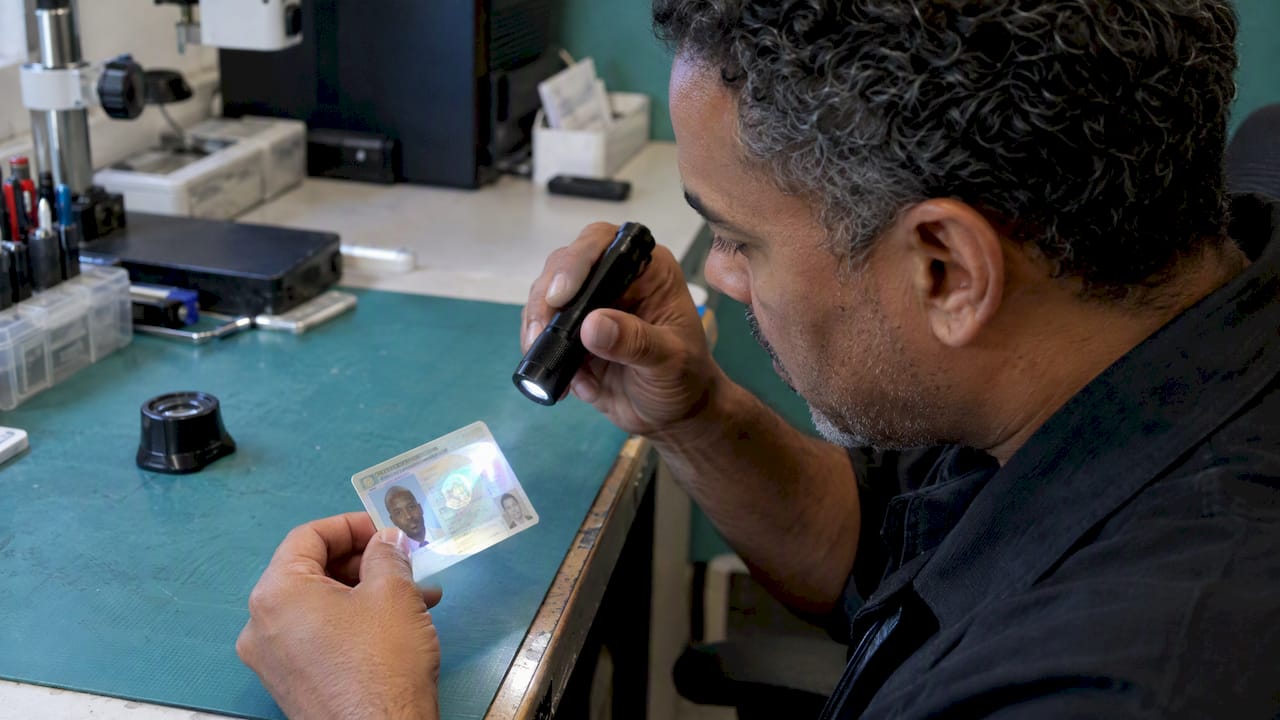
Modern U.S. driver’s licenses and ID cards rely on layers of security features: a tamper-resistant polycarbonate body, laser-engraved and tactile elements, holograms or color-shifting films, secondary portraits, and a two-dimensional barcode that increasingly carries a digital signature. No single layer is reliable alone. Counterfeiters copy the visible ones first, so the useful question is not whether a card has a hologram but whether each feature behaves the way that state’s current document is supposed to behave.
This guide explains what the main features do, why holograms in particular fail as a stand-alone check, what is changing as states redesign their cards, and what that means for teams that verify identity in person or remotely.
TL;DR
- Physical IDs combine overt features (holograms, tactile text, secondary photo), covert features (UV and infrared elements) and forensic ones. Verification works only when several layers are checked together.
- A hologram that merely looks shiny proves little. Replicated reflective films pass a glance, so check how the element shifts and compare it with the exact state and issue year.
- Newer cards, such as California’s design from October 1, 2025, move trust into digital signatures embedded in barcodes, so scanners must read high-resolution 2D barcodes, not magnetic stripes.
- Mobile driver’s licenses add selective disclosure and biometric checks, but they change the fraud surface rather than removing it.
Table of Contents
- The three layers of ID security
- Holograms on IDs: why “it shimmers” is not a test
- Polycarbonate, laser engraving and the REAL ID star
- From magnetic stripes to signed barcodes
- What changes when the ID is digital
- Checking IDs remotely: where physical features fall short
- A practical checklist for teams that verify IDs
- Perspective: why feature checks alone are an obsolete defense
- Where to go deeper
- FAQ
- Sources
The three layers of ID security
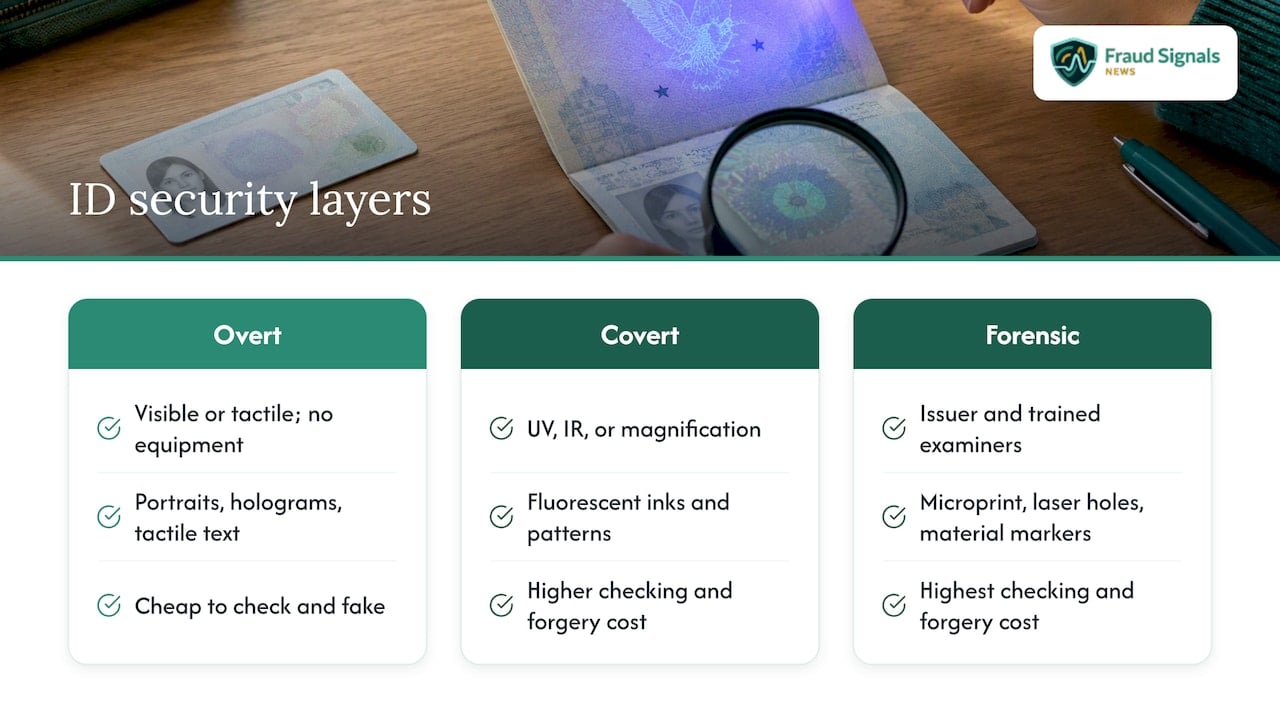
Security specialists usually sort features by who can see them and with what tool. State agencies describe the same structure in their own material: Virginia’s issuance documentation, for example, separates first-level features, which are visible design elements such as the photograph and tactile printing, from second-level features that need magnification or a special light.
1. Overt (first-line) features. Anyone can see or feel these without equipment. Examples are the main portrait, a smaller ghost or secondary portrait, tactile laser-engraved text, microtext that looks like a solid line, and optically variable devices such as holograms. A description of the new REAL ID card notes that the polycarbonate body feels stiffer and thicker than older laminated cards and that the face carries a secondary photo and tactile text.
2. Covert (second-line) features. These need a UV lamp, infrared viewer, loupe or similar. Fluorescent inks that reveal state seals or patterns under UV are the classic example. They matter because counterfeiters often print a convincing front and forget that the card must also behave correctly under non-visible light.
3. Forensic (third-line) features. Known to the issuer and a few trained examiners: specific microprinting layouts, laser-perforation patterns, proprietary material markers. Frontline staff are not expected to check these, but they explain why a card that passes a bar’s inspection can still fail a lab.
The practical rule is that the cost of defeating a layer rises as you move down this list, while the cost of checking it rises too. Most front-line fraud happens in the cheap-to-check, cheap-to-fake zone.
Holograms on IDs: why “it shimmers” is not a test
Holograms are the feature readers ask about most, and they are the feature most often misjudged. When an ID is tilted under normal light, holographic images, seals, patterns or text may appear, disappear or change color, as IDScan’s explainer on U.S. ID holograms describes. That behavior is the security property. A flat, always-visible sticker with a rainbow sheen is not.
The weakness is that counterfeiters now replicate reflective films and simulated holographic elements that pass a superficial check. The same source’s guidance for professionals is to verify that the hologram’s behavior, such as shifting patterns, color changes or light reflection, matches the technical specification for the specific state and document version. That last clause carries most of the weight. States have reissued designs repeatedly, and a hologram that was correct on a 2016 card may be wrong on a 2025 one.
How to inspect a hologram properly
- Identify the state and issue year first. Without a reference image for that exact version, you are guessing.
- Tilt the card in several directions and watch whether elements animate, switch images or shift color as the reference says they should.
- Check the edges and surface. On genuine cards, overlays and engraved features sit within the card body. Peeling edges, raised films or visible seams suggest a laminate stuck over a printed card.
- Cross-check with a non-optical feature, such as tactile text, the barcode data or UV response. A forger can fake one layer more cheaply than three.
Low light is where checks go wrong
Bars, hotel desks and parking-lot checkpoints are poorly lit, which hides exactly the features you need. Pennsylvania’s security feature FAQ describes using a flashlight at roughly a 30° to 60° angle to reveal tactile engravings and light-switching holograms that look flat or fail to animate under static ambient light. The point generalizes: the angle of light is part of the test, and a card inspected only under a ceiling fixture has not really been inspected.
Polycarbonate, laser engraving and the REAL ID star
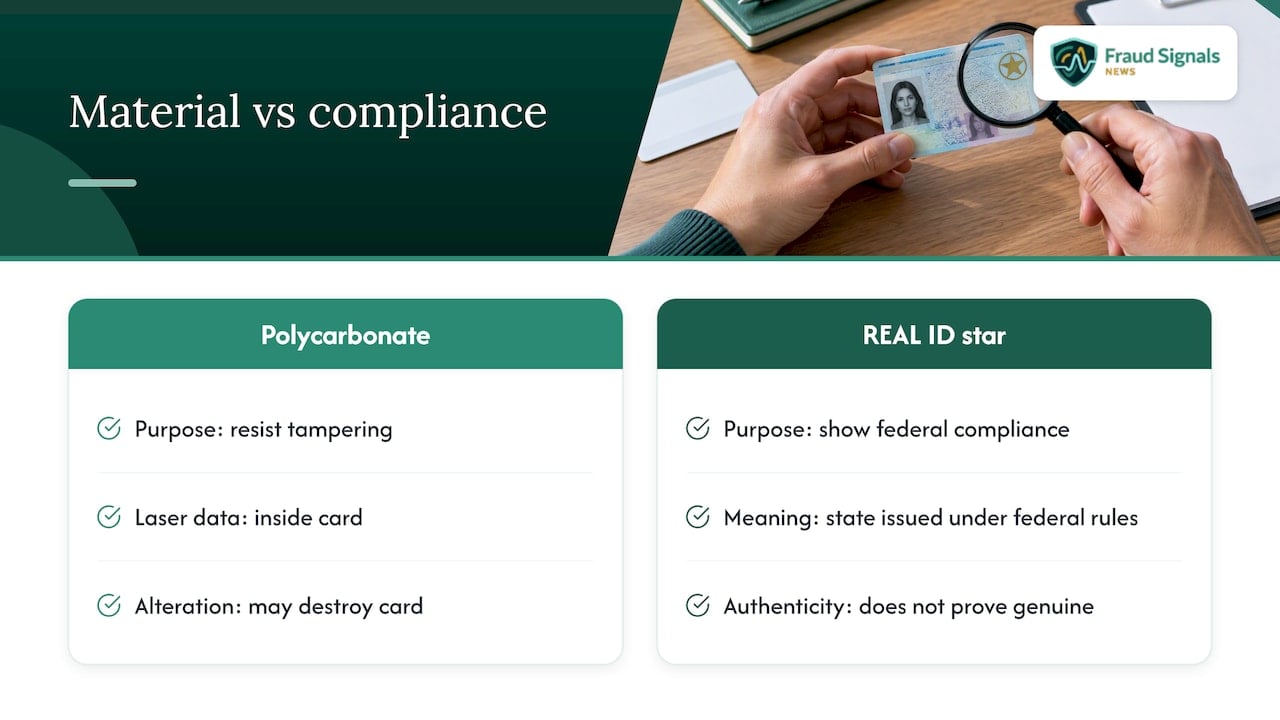
The most significant physical change in the past decade is the move to polycarbonate. Texas, for instance, announced new licenses and IDs with tamper-resistant polycarbonate material and a laser-engraved black star for REAL ID compliance. The reason is structural: polycarbonate layers fuse into a single body, so personalization data engraved by laser is inside the card rather than printed on its surface. Attempts to delaminate and alter the portrait or date of birth tend to destroy the card.
Laser engraving also creates the tactile quality inspectors are trained to feel. Raised text over the portrait and data fields should feel different from flat ink, and the engraved portrait should match the printed one. A mismatch between the main photo and the secondary ghost image is one of the fastest manual checks available.
The star itself is a compliance marker, not an anti-fraud feature. Since May 7, 2025, TSA enforces full REAL ID compliance: travelers need a REAL ID-compliant license, a passport or another federally accepted ID to board domestic flights and enter certain federal facilities. A card with a star is meeting issuance standards set under the REAL ID Act, which Congress passed in 2005 following the 9/11 Commission’s recommendation. It tells you the state issued the card under federal rules, not that this particular card is genuine.
Travelers who show up without acceptable ID now face a cost. From February 1, 2026, passengers without an acceptable ID may pay a $45 fee to use TSA ConfirmID to proceed through screening. For readers weighing documents before a trip, this guide to passport or REAL ID for travel covers the choice when departure is days away.
From magnetic stripes to signed barcodes
The back of the card is where the quietest shift is happening. California began issuing a new design on October 1, 2025, and the California DMV announcement describes digital security signatures within barcodes and the removal of magnetic strips. Current California licenses remain valid until they expire or are replaced, and the upgraded license fee is $45, with ID cards at $39.
This matters for anyone who checks IDs at scale:
- Magnetic stripe readers are legacy hardware. Stripe data was easy to copy and carried no signature that proved who issued it.
- A digital signature turns the barcode into evidence. If the encoded data was altered, the signature should fail validation, even when the printed front looks perfect.
- Scanner quality becomes a control. Organizations need hardware that reads high-resolution 2D barcodes reliably, and software that validates the data structure rather than just displaying it.
- Front-back consistency checks catch lazy forgeries. Data decoded from the barcode should match the printed name, date of birth and ID number. Cheap counterfeits frequently fail this.
The weakness of the old process is plain: many venues and onboarding flows still treat a photo of the front as sufficient. For a deeper view of how counterfeit documents are built and caught, see our coverage of counterfeit ID cards.
What changes when the ID is digital
Mobile driver’s licenses (mDLs) move the trust anchor from printed features to cryptography. According to the TSA, digital IDs allow selective disclosure: sharing only the data points a verifier needs, while requiring biometric authentication such as facial recognition before every transaction. The agency says you can use a Digital ID at more than 250 airports through Apple Wallet, Google Wallet, Samsung Wallet or a state-issued app, and that TSA sees only necessary information. Our preflight walkthrough covers the practical steps in TSA digital ID at 250+ checkpoints.
Privacy design is part of the security story. TSA’s PreCheck Touchless ID program states that photos and personal data collected during verification are generally deleted immediately or within 24 hours of flight departure and not shared for surveillance or law enforcement purposes. That is a design choice organizations can copy when they handle biometric templates; our piece on biometric data privacy controls lists six operational measures.
Two cautions apply. First, a digital credential is only as strong as the enrollment behind it: if someone is issued a mobile ID against a forged document or a deepfaked selfie, the cryptography faithfully protects a fraudulent identity. Second, verifiers still need to confirm that the presenting person is live and matching, not a replay. Our analysis of capture integrity and deepfake ID fraud explains where that breaks.
Checking IDs remotely: where physical features fall short
In an app or web onboarding flow, a customer submits a photo of a card. Most physical security features lose their value in that format. A hologram photographed flat tells you nothing about how it tilts. Tactile text is invisible. UV features do not exist on a phone screen. What remains is what the camera and software can derive:
- Document authentication: font, layout, template and barcode validation against known versions of each state’s ID.
- Capture analysis: detection of screens, printouts, photocopies and re-photographed images.
- Biometric match: comparing the live selfie with the document portrait.
- Liveness and injection defenses: confirming a real person is present and that the video stream was not replaced by a virtual camera or synthetic media.
The fourth item is where many programs are exposed. We explain the attack classes in replay and injection fraud with NIST-aligned liveness, and the selfie-matching step in selfie identity verification.
Standards help define what “good enough” means. NIST’s identity proofing guidance, SP 800-63A-4, requires independent performance testing for biometric systems and sets a demographic parity limit: performance for any group by sex, age or skin tone cannot be more than 25% worse than for the overall population. A vendor that cannot show that testing should not be gating your onboarding. For the process side, read the three identity proofing steps fraud teams cannot skip.
A practical checklist for teams that verify IDs
| Check | In person | Remote |
|---|---|---|
| Tactile text and engraving | Feel with a fingertip, compare with portrait | Not possible |
| Hologram or color-shift behavior | Tilt, use angled light, compare with state reference | Limited; needs video and specialized analysis |
| Secondary portrait | Match to main photo | Match through software |
| UV or infrared features | UV lamp, if equipped | Not possible |
| Barcode data | Scan, validate signature where present, compare with front | Decode and cross-check |
| Card body and edges | Inspect for seams, lifting films | Weak signal only |
| Liveness of the holder | Observe the person | Active or passive liveness plus injection detection |
Three operating habits make this checklist work:
- Keep reference libraries current. States change designs; California’s rollout is a recent example. Staff and software trained on last year’s template will reject genuine cards and accept good fakes.
- Escalate on mismatch, not on a single oddity. Worn cards produce odd results. Two or three failed layers are a stronger signal than one.
- Log outcomes. Which feature failed, on which state’s card, feeds the next training session and the next rules update.
Perspective: why feature checks alone are an obsolete defense
We read a lot of incident reports, and the pattern is consistent: organizations still treat the physical card as the root of trust because that is how identity checks worked when the only attacker was a teenager with a laminator. The attacker today is organized, buys template kits, and tests which controls a venue or a bank actually enforces. A hologram glance is a low-assurance bypass: it takes seconds and rarely fails the forger.
Our view is that ID security features are best understood as evidence inputs, not verdicts. Each one narrows uncertainty, and the decision should rest on how many independent layers agree: material, engraved data, barcode signature, biometric match and liveness. Where a process relies on one visual feature, or on a stripe reader that cannot validate anything, it fails predictably and the cost lands on the institution.
We also think the shift to signed barcodes and mobile credentials is the right direction, with a caveat the industry underplays: stronger credentials move fraud upstream to enrollment and to the capture channel. Teams that invest in scanners and mDL readers but leave remote selfie capture unguarded will see attackers simply relocate.
— Carlos Ochoa
Where to go deeper
Fraud Signals News covers the operations side of identity verification: biometric authentication, liveness, deepfake ID fraud and the standards behind them. If you are deciding how document checks and biometrics fit together, start with why biometrics reduce bank fraud, or browse the full archive at Fraud Signals News.
FAQ
What makes a REAL ID more secure?
A REAL ID is issued under federal minimum standards set by the REAL ID Act of 2005, and states typically pair it with tamper-resistant materials such as polycarbonate, laser engraving and a marker like a star. The star shows compliance with issuance rules, not that a particular card is genuine. Verification still depends on checking the features themselves.
Can a hologram on an ID be faked?
Yes. Counterfeiters now replicate reflective films and simulated holographic effects that pass a quick look. A reliable check compares how the element shifts and changes color against the exact state and version, and confirms with other layers such as tactile text and the barcode.
Are digital IDs safer than physical ones?
They can be, because they support selective disclosure and require biometric authentication before each use, according to TSA. They are only as trustworthy as the enrollment process that issued them, so a forged source document undermines the whole credential.
Why do new licenses drop the magnetic stripe?
Stripe data is easy to copy and cannot prove who issued it. California’s 2025 design removes it in favor of digital security signatures within barcodes, which verifiers can validate. Organizations need scanners that read high-resolution 2D barcodes.
Sources
- California DMV: new license and ID card design with advanced security features
- TSA: Timeline, REAL ID full enforcement
- TSA: About REAL ID
- TSA: Acceptable identification at the checkpoint
- TSA: Digital ID and facial comparison technology
- TSA: PreCheck Touchless ID
- NIST SP 800-63A-4: Identity proofing and enrollment
- IDScan: Holograms on U.S. IDs
- Pennsylvania DL/ID security feature FAQ
- FedLaws: What the new REAL ID license looks like
Recommended

Face Liveness Detection: How It Works and Where It Fails

FRVT Results Analysis: How to Read NIST Face Test Data