

Most NFC-capable phones can read the chip inside an ePassport, provided the document carries the ePassport symbol and the reading app supports BAC or PACE. A successful read surfaces the biographic data and portrait stored on the chip, but that alone does not confirm the person holding the phone is the lawful bearer. Flows that combine chip reads with liveness checks or server-side validation close that gap.
TL;DR:
- iPhone 7 and later support compatible passport reader apps; Android phones need NFC enabled, and antenna placement varies by manufacturer.
- Before scanning, check for the ePassport symbol, remove metal or magnetic accessories, and enter the MRZ accurately; passport cards use RFID instead.
- DG1 contains biographic fields, DG2 stores the portrait, and optional data groups may reveal different details across passports.
- Local reader apps display chip fields without a verification decision; identity checks require liveness or server validation, because Passive Authentication confirms data origin, not who presents it.
- If scanning fails, check NFC settings, phone placement, app permissions, and MRZ details; try another app before assuming the chip is damaged.
Table of Contents
- Built-In Phone Features and Third-Party Apps That Read Passports
- Step-by-Step: Prepare and Perform a Successful Passport NFC Read
- What the Data Groups on the Chip Actually Mean
- What Authentication Checks Mean and the Limits of a Phone-Only Read
- Common Failures When Scanning Passport NFC and How to Fix Them
- How Chip Reads Fit Into Identity and Anti-Fraud Workflows
- Guides for Teams Building on Chip-Reading Knowledge
- FAQ
- Sources
Built-In Phone Features and Third-Party Apps That Read Passports
The right tool depends on whether you need a quick inspection or a verification result you can act on. Apple’s Digital ID flow sequences an MRZ scan, an NFC chip read, Passive Authentication of the Document Security Object, and a selfie or liveness check before binding the result to a device. That sequencing matters because document authenticity and person authenticity are checked separately, and Apple’s own security documentation treats them as distinct steps rather than one combined proof.
Client-side reader apps work differently. ReadID Me performs a local chip read and displays the stored fields without a verification decision attached, while diagnostic tools built on NFC TagInfo report raw tag and chip metadata for inspection rather than identity assurance. Developer libraries such as NFCPassportReader show how CoreNFC-based tools retrieve DG1 and DG2 once supplied with a valid MRZ key, which is the same mechanical process many consumer apps wrap in a simpler interface.
A few practical distinctions worth knowing before you pick a tool:
- iPhones with CoreNFC support (iPhone 7 and later, running a current iOS version) can run passport-reading apps; older models cannot.
- Android devices need NFC hardware enabled in settings, and chip placement varies by manufacturer.
- Some apps keep every byte on-device and never transmit data; others send the read to a server for cross-checking against issuing authority signatures.
- A simple inspection app is fine for curiosity or troubleshooting, but a transaction that depends on identity assurance needs a flow built for verification, not just a reader.
Step-by-Step: Prepare and Perform a Successful Passport NFC Read
A clean read depends more on preparation than on the app you choose. Before scanning, confirm the document carries the ePassport symbol on its cover or data page, since that symbol is the official signal that a contactless chip is embedded. Passport cards use RFID instead and are not equivalent for this purpose.
- Enable NFC on your phone and remove any metal case, magnetic wallet insert, or credit card that might block the signal.
- Open your chosen app and, if prompted, scan or manually enter the MRZ: document number, date of birth, and expiry date, each typically in YYMMDD format with a checksum digit.
- Lay the passport flat and hold your phone over the data page, usually near the center or inner edge depending on chip placement, and keep both still.
- Wait for the app to confirm a connection and complete the BAC or PACE handshake before it begins pulling data.
- Once finished, check the result screen for DG1 (name, document number, date of birth), the DG2 portrait, and whether the app reports Passive Authentication success or needs a server round trip.
Pro Tip: If the MRZ scan keeps failing, type the fields manually instead of relying on the camera, since glare and worn laminate commonly cause OCR misreads.
iPhone users should expect the read to feel brief and automatic once CoreNFC locks onto the chip. Android users may need to experiment with phone orientation, since antenna placement differs across manufacturers and a read that fails in one position can succeed an inch to the left.
What the Data Groups on the Chip Actually Mean
Everything a reading app shows comes from a defined structure, not an arbitrary dump of fields. ICAO Doc 9303 sets the logical data structure for ePassport chips, specifying which data groups are mandatory and which are optional.
- DG1 holds the MRZ-derived biographic fields: document number, full name, date of birth, nationality, and expiry date, mirrored from the printed data page.
- DG2 stores the portrait image, usually in JPEG or JPEG2000 format, and image quality can vary depending on the capture equipment used at issuance.
- SOD, the Document Security Object, contains hashes of each data group plus a digital signature from the issuing authority, the basis for Passive Authentication.
- DG11 and DG12 are optional groups some passports populate with extra personal or document details, which explains why two passports from different countries can show different amounts of data for the same read.
What Authentication Checks Mean and the Limits of a Phone-Only Read
A chip read can tell you whether the data was signed by a legitimate authority, but it cannot by itself tell you who is standing in front of the phone. Passive Authentication checks that the SOD’s signature traces back to a valid issuing authority and flags tampering with the stored data, but it says nothing about who presented the document.
- Passive Authentication confirms data integrity and origin, not the identity of the presenter.
- Chip Authentication and Active Authentication, where supported, add anti-cloning evidence by proving the chip itself is genuine rather than a copied dataset, though not every passport or reading app implements these checks.
- PACE, used in newer documents, strengthens the key-establishment step beyond basic BAC but does not change what the read proves about the person holding the document.
- Tying a chip read to the actual bearer requires a separate step, typically a selfie or liveness check or a server-side evaluation against the signed data.
A successful Passive Authentication result confirms the issuing authority signed the chip data, but it does not confirm the chip is being read from the person who was originally issued the document. That distinction is why vendor flows like Apple’s pair the chip read with a biometric step rather than stopping at the cryptographic check.
Common Failures When Scanning Passport NFC and How to Fix Them
Most failed reads trace back to a handful of predictable causes rather than a damaged chip. A phone case with a metal plate, a magnetic wallet insert, or simply holding the phone over the wrong spot on the data page accounts for a large share of failed attempts. Software issues, including NFC left off in settings or an app denied the permissions it needs, are just as common.
- Hardware and placement: remove cases, magnets, and other cards before scanning.
- Software and permissions: confirm NFC is toggled on and grant any permission the app requests.
- Document condition: expired, water-damaged, or heavily worn passports can fail the BAC or PACE handshake entirely.
- MRZ mismatches: swapped date formats or a mistyped document number will block key derivation even when the chip itself is fine.
Pro Tip: If one app repeatedly fails, try a second app before assuming the chip is damaged, since app-level bugs are more common than hardware failure. When none of these fixes work and the passport is otherwise valid, contact the issuing passport authority rather than continuing to retry.
How Chip Reads Fit Into Identity and Anti-Fraud Workflows
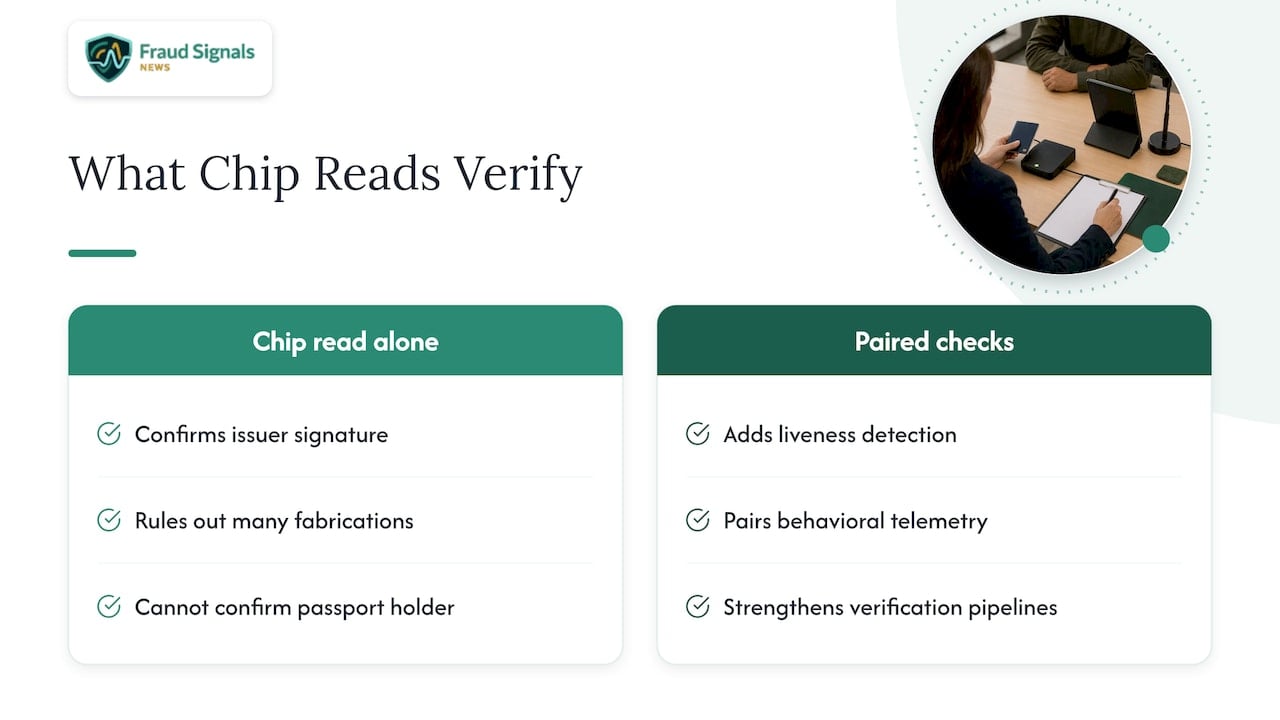
We think of a chip read as a strong document-integrity signal, not a complete identity decision, as covered in the Top Tech and Cybersecurity News for August. It confirms the data was signed by an issuing authority, which rules out a large category of fabricated documents, but on its own it leaves the door open to someone presenting a genuine passport that is not theirs.
Teams building border-inspection augmentation, remote onboarding triage, or escalation triggers for high-risk transactions get the most value when chip reads are paired with liveness checks and behavioral telemetry. Attackers increasingly probe for cloned chips and tampered MRZ fields, which is why pairing Passive Authentication with liveness detection standards rather than relying on either alone has become the more defensible approach for verification pipelines.
— Carlos Ochoa
Guides for Teams Building on Chip-Reading Knowledge
Understanding what a phone can and cannot prove about an ePassport is only the first layer of a verification stack. We cover the biometric side of that stack in our guide to selfie identity verification, which explains how liveness checks close the gap a chip read leaves open.

For teams assembling a full process around these signals, our identity verification upgrade checklist walks through where chip reads, liveness, and telemetry fit together, and our guide to biometrics and bank fraud goes deeper on the fraud-reduction case for combining these checks.
FAQ
Which NFC app can read my passport?
ReadID Me and TagInfo-style diagnostic apps can perform local reads and display chip data, while built-in flows like Apple Wallet’s Digital ID add MRZ scanning and liveness checks on top of the read. The right choice depends on whether you want a quick inspection or a result meant to verify identity.
Can my iPhone read an NFC passport?
iPhone 7 and later models support CoreNFC, which lets compatible apps read an ePassport chip once you scan or enter the MRZ. The built-in Digital ID flow in Apple Wallet uses this same NFC capability alongside a selfie check.
How do I check my passport NFC?
Look for the international ePassport symbol printed on the cover or data page, which confirms a contactless chip is embedded. If the symbol is present, enabling NFC on your phone and opening a reader app should detect the chip once positioned correctly.
Why isn’t my NFC reader scanning my passport?
The most common causes are a metal phone case or magnetic wallet blocking the signal, NFC turned off, or the phone positioned over the wrong spot on the data page. A mistyped or misformatted MRZ entry can also block the BAC or PACE handshake even when the chip itself is undamaged.
Sources
- IDs in Apple Wallet – Apple Support
- Design and Security of our Documents
- Doc 9303, Parts 3/4/5 (ICAO)
Recommended
ID Security Features: What Each One Does and How to Check It

Face Liveness Detection: How It Works and Where It Fails