
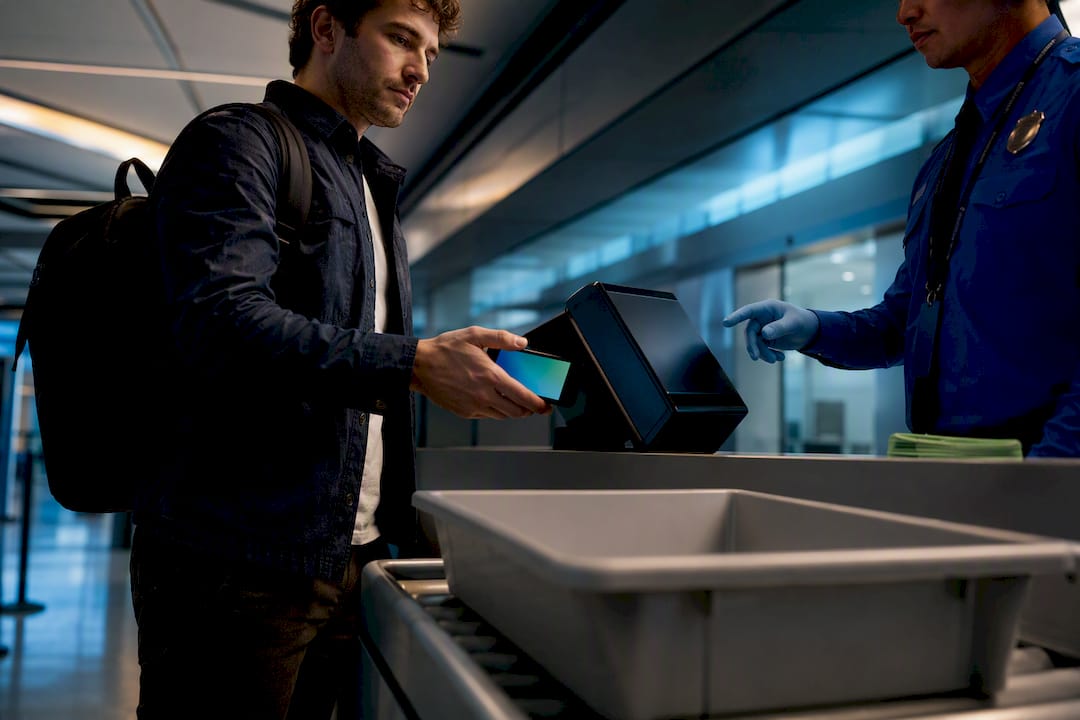
TSA now accepts certain state-issued digital IDs, including Apple Digital ID, Google Wallet ID pass, Samsung Wallet, and Clear ID, at select checkpoints nationwide. Participation is entirely voluntary, and TSA still requires travelers to carry a physical, acceptable ID as backup. Before you fly, check Tsa for your state’s status, confirm your airport supports it, and expect a consent prompt at the checkpoint, since officers will not scan your credential without your affirmative go-ahead.
TL;DR:
- Digital IDs are accepted only in certain states and airports, requiring travelers to verify support for their specific location and wallet platform beforehand.
- Using a digital ID involves adding a real ID–compliant credential to your wallet, updating your device, and charging your phone to prevent malfunctions.
- Upon reaching the checkpoint, travelers must follow signage, consent explicitly, and may need to take a live photo, but can decline biometric steps without penalties.
- TSA accepts several backup IDs, including REAL ID and passports, with TSA ConfirmID as a last resort, though it is slower and incurs fees.
- Privacy protections involve minimal data sharing, but travelers should scrutinize unsolicited prompts and avoid relying solely on screenshots for verification needs.
Table of Contents
- Where TSA Accepts Digital Identity: Participating States, Platforms, and Airports
- How to Use Your Digital ID at the Checkpoint
- TSA PreCheck Touchless ID: Eligibility and Opt-In
- What Does TSA See When Scanning Your Digital ID?
- If Your Digital ID Fails: REAL ID, Passports, and ConfirmID
- What Digital ID Means for Fraud and Traveler Safety
- The Gap Between TSA’s Pitch and How Travelers Actually Use Digital ID
- Another Option: Follow Fraud Signals News for Ongoing Coverage
- Sources
- FAQ
Where TSA Accepts Digital Identity: Participating States, Platforms, and Airports
TSA’s digital ID rollout is uneven by design. Some states have pushed hard into mobile driver’s licenses; others haven’t started. The agency maintains a running list of participating states and supported wallet platforms directly on its digital ID page, and that page is the only reliable source, because state programs change faster than most travel blogs update.
The technology stack behind this is simpler than it looks. A traveler’s phone holds a digital ID pass issued by their state DMV and stored in a wallet app. At the checkpoint, a Credential Authentication Technology (CAT-2) reader pulls the credential, checks it against Secure Flight data, and verifies it in near real time. TSA reports more than 250 checkpoints now accept some form of digital ID, though availability still varies by terminal, not just by airport.
Before you count on using a digital ID at your departure gate, confirm three things:
- Your state appears on TSA’s participating-states list, since not every state has an mDL program yet.
- Your specific airport and terminal support digital ID at the checkpoint you’ll use, because TSA notes availability can differ by terminal even within the same airport.
- Your wallet platform, whether Apple Wallet, Google Wallet ID pass, Samsung Wallet, or Clear ID, is actually supported by your state’s issuing program.
Skipping this check is the most common reason travelers get stuck at the checkpoint expecting a tap-and-go experience that simply isn’t live yet at their gate.
How to Use Your Digital ID at the Checkpoint
Getting through security with a digital ID takes more preparation than pulling out a physical driver’s license, mostly because your device has to be ready to perform.
Before you leave for the airport:
- Add your state’s mobile driver’s license or digital ID pass to your wallet app, and confirm it’s built on a REAL ID-compliant credential, since TSA will not accept a digital ID that isn’t.
- Update your phone’s operating system and wallet app to the latest version. Outdated software is a frequent cause of failed scans.
- Charge your device. A dead phone at the checkpoint means you’re back to a manual ID check regardless of what’s loaded on it.
At the checkpoint itself:
- Look for signage indicating the lane accepts digital ID. Not every lane at a digital-ID airport runs this option.
- Follow the officer’s instructions, then tap your device or scan the checkpoint’s QR code as directed.
- Consent explicitly to share your credential. TSA will not proceed without this step, since participation is voluntary at every stage.
- If prompted, a live photo is taken and matched against your digital ID for verification.
- The officer completes the check and clears you to proceed.
If your scan fails or you’d rather skip the photo step, decline it. TSA officers will run the standard manual ID verification process instead, and you lose no time in the queue that you wouldn’t lose otherwise.
Pro Tip: Screenshot your digital ID as a backup image before you leave home, but never rely on the screenshot alone at the checkpoint. TSA readers need the live wallet credential, not a static image, so the screenshot is just a personal reference if your app misbehaves.
TSA PreCheck Touchless ID: Eligibility and Opt-In
Touchless ID is a distinct program from the general digital ID rollout, built specifically around facial comparison technology to speed up identity verification for eligible travelers at select airports. Where a standard digital ID check reads a credential from your wallet, Touchless ID compares your face directly against records tied to your TSA PreCheck enrollment.
Eligibility generally comes down to one thing: TSA PreCheck membership. Opt-in mechanics vary by airport and airline, but the common paths are:
- Enrolling through a participating airline’s app or check-in flow, which links your PreCheck status to the Touchless ID system.
- Opting in through Google Wallet, depending on the specific airport’s program configuration.
- Checking tsa.gov/touchless-id directly, since TSA updates the airport list there as the program expands.
Touchless ID isn’t a replacement for carrying acceptable identification. It’s an expedited layer on top of PreCheck, available only where the infrastructure exists, and your airline is usually the fastest source for whether your upcoming flight qualifies.
What Does TSA See When Scanning Your Digital ID?
Privacy questions dominate the conversation around TSA digital identity, and for good reason. Here’s what actually happens: TSA requires explicit consent before any digital ID or facial comparison step, and officers use only the minimum identity fields needed to verify you against Secure Flight data.
During active pilot and testing periods, DHS’s Science and Technology Directorate may temporarily analyze passenger data, including live photos, under defined deletion windows of up to 24 months. Outside of testing, routine checkpoint operations don’t retain your digital ID file, and live photos are overwritten between passengers rather than stored.
You can decline the biometric or digital ID step entirely and still get through security via a standard manual ID check, with no penalty to your screening timeline. TSA also publishes privacy impact assessments for each pilot, alongside checkpoint signage that flags which lanes are running digital ID or facial comparison technology.
Pro Tip: If a checkpoint lane doesn’t post signage about digital ID, treat that as your cue that it’s not running there yet. Signage is TSA’s way of making consent explicit, not optional decoration.
If Your Digital ID Fails: REAL ID, Passports, and ConfirmID
A failed scan or an unsupported state shouldn’t derail your trip if you plan ahead. TSA accepts several backups:
- A REAL ID-compliant driver’s license or Enhanced Driver’s License.
- A U.S. passport or passport card.
- A Department of Defense ID.
- An enhanced tribal card.
If you show up without any acceptable ID, TSA ConfirmID exists as a fee-based verification option that lets you complete an identity check through documentation review rather than a standard credential. It works, but it takes longer and costs money, so it’s a last resort, not a plan. Arrive early, bring a charged phone alongside your physical ID, and check your specific airport’s procedures before departure.
What Digital ID Means for Fraud and Traveler Safety
Cryptographically backed digital credentials are harder to counterfeit than a laminated card, mainly because wallet-based IDs let you share only the minimum data required rather than exposing a full physical document to visual inspection. That’s a genuine improvement over the fraud playbook built around fake plastic IDs.
It also creates new attack surfaces. Watch for off-channel QR codes that didn’t come from the checkpoint reader itself, prompts asking for more data than the standard verification flow requests, and wallet apps you haven’t updated in months. Fraud Signals News tracks how identity verification systems reduce exposure across travel and finance, and the pattern holds here too.
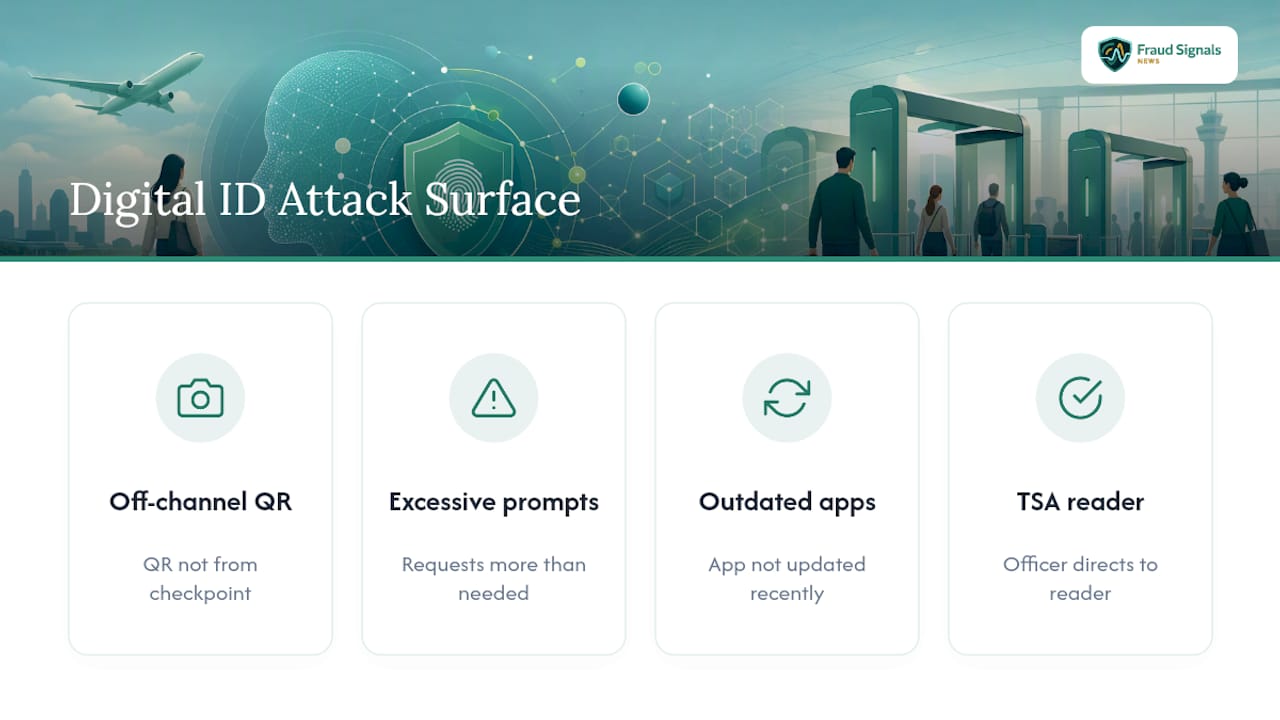
Pro Tip: Never approve a wallet prompt you didn’t initiate yourself at the checkpoint. Legitimate TSA verification starts with an officer directing you to a specific reader, not a link or code that arrives unprompted.
The Gap Between TSA’s Pitch and How Travelers Actually Use Digital ID
Most coverage of TSA digital identity treats it as either a privacy threat or a convenience upgrade, and both framings miss the point. The technology is voluntary, unevenly deployed, and still dependent on device readiness that most travelers underestimate until their phone dies in the security line.
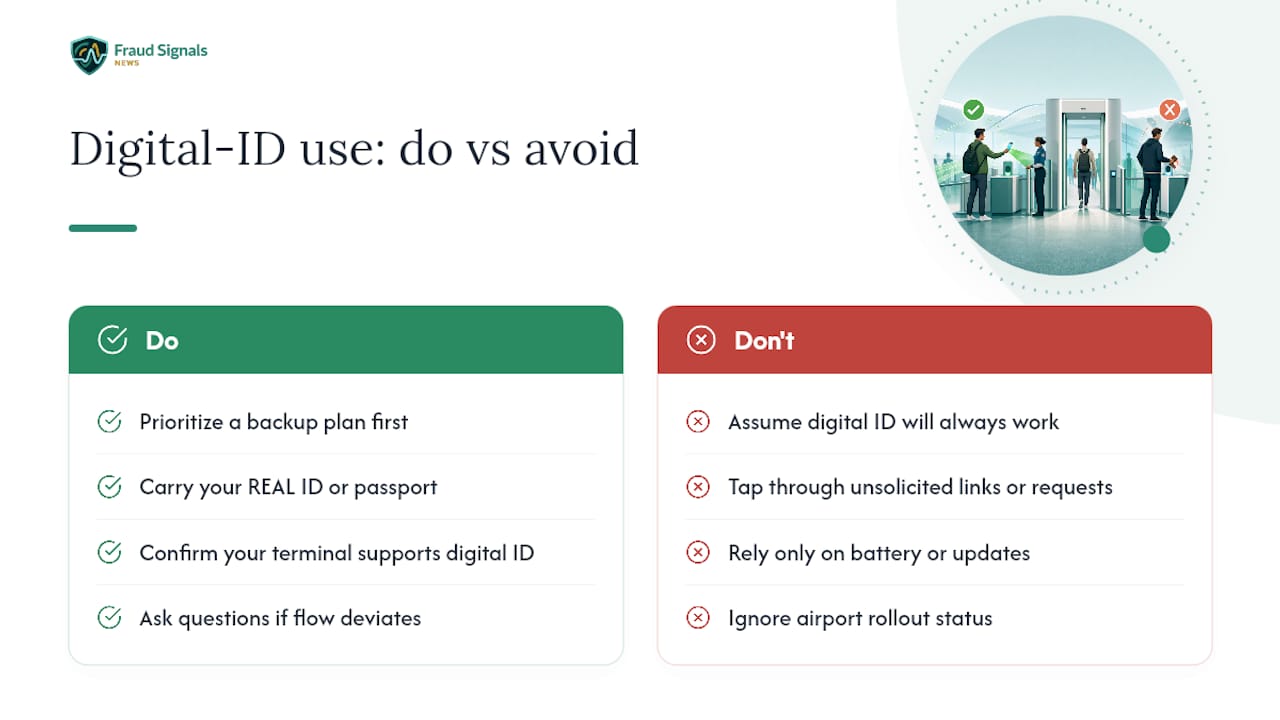
What the research actually supports is narrower than the hype: digital ID reduces certain fraud vectors, mainly counterfeit physical documents, but it introduces new dependencies on software updates, battery life, and airport-specific rollout status that a paper license never had. Conventional travel advice tends to bury the consent mechanics and the fallback options in favor of promoting the tap-and-go novelty.
If you’re deciding how much to trust this system, prioritize the backup plan first, not the technology. Carry your REAL ID or passport regardless of what’s loaded on your phone. Confirm your specific terminal supports digital ID before assuming it does. And treat any deviation from the standard officer-directed flow, an unsolicited link, an unexpected data request, as a signal to stop and ask questions rather than tap through it.
— Carlos Ochoa
Another Option: Follow Fraud Signals News for Ongoing Coverage
TSA’s digital ID rollout will keep shifting: new states join, pilots expand, and privacy rules get revised as DHS evaluates real-world results. Fraud Signals News is the outlet built specifically to track those changes as they happen, rather than treating this as a one-time explainer that goes stale within months.

For security-conscious travelers, following ongoing coverage means you’ll know the moment your state gets added to the participating list, or when a new privacy safeguard changes what happens to your live photo during a pilot program. Fraud Signals News also covers the broader identity verification landscape, including how biometric authentication reduces fraud exposure in banking and fintech, and what consent best practices look like when your face or credential is on the line. Visit Fraud Signals News and bookmark the site for updates before your next trip through a digital-ID checkpoint.
FAQ
Is TSA Digital ID Mandatory?
No. TSA digital ID is entirely voluntary, and travelers who decline it receive a standard manual ID check with no penalty to their screening process.
Is TSA Turning People Away Without REAL ID?
TSA requires an acceptable form of ID, and a REAL ID-compliant credential is one option among several, including a U.S. passport. Travelers without any acceptable ID can use the fee-based TSA ConfirmID process rather than being turned away outright.
What States Have a Digital ID?
TSA publishes a current list of participating states on its digital ID page, since state mobile driver’s license programs roll out on different timelines and that list changes as more states join.
What Does TSA See When They Scan Your ID?
TSA verifies minimal identity fields against Secure Flight data and, only with your consent, a live photo matched to your credential. Routine operations don’t retain your digital ID file, and photos are overwritten between passengers outside of active testing periods.
Recommended
ID Security Features: What Each One Does and How to Check It

Face Liveness Detection: How It Works and Where It Fails