
Keystroke dynamics biometrics is a software-only behavioral authentication method that verifies identity by measuring how someone types, not what they type. It reads timing signals like dwell time, flight time, and digraph rhythm to confirm a user is who they claim to be. It works best as a password hardening layer or a continuous authentication signal running quietly in the background, but its accuracy degrades with session drift, fatigue, device switching, and language changes, so any deployment needs per-user calibration rather than a fixed global threshold.
TL;DR:
- Keystroke dynamics accuracy diminishes significantly with session drift, fatigue, device switching, and language changes, so continuous calibration per user is essential.
- Both fixed-text and free-text enrollment methods have trade-offs: fixed-text is quicker and suited for login protection, while free-text requires more data but supports ongoing session monitoring.
- Distance-based and shallow machine learning models are preferable for browser scoring to minimize latency, whereas heavier neural network models are better suited for server-side analysis.
- Public datasets like Killourhy & Maxion or KeyRecs are standard benchmarks, with metrics such as EER and AUC used to evaluate system performance across sessions.
- Effective deployment involves initial careful enrollment, cross-session testing, ongoing template retraining, and clear user consent, especially for continuous authentication scenarios.
Table of Contents
- How Keystroke Dynamics Biometrics Works: Signals, Features, and Enrollment
- Which Algorithms Power Keystroke Analysis Techniques?
- What Datasets and Metrics Do Researchers Use to Benchmark Keystroke Dynamics?
- Static vs. Continuous Authentication: Choosing the Right Deployment Mode
- What Limits Keystroke Dynamics Accuracy, and How Do Attackers Exploit It?
- How Do You Build a Production-Ready Keystroke Dynamics Pilot?
- Where Keystroke Dynamics Fits in the Bigger Identity Verification Picture
- Sources
- FAQ
How Keystroke Dynamics Biometrics Works: Signals, Features, and Enrollment
Every keystroke produces a set of measurable timing events, and keystroke dynamics turns those events into a behavioral fingerprint. Dwell time measures how long a key stays pressed. Flight time measures the gap between releasing one key and pressing the next. Systems also track digraphs (two-key sequences) and trigraphs (three-key sequences), since the rhythm between specific letter pairs, like “th” or “er”, tends to be more stable per person than overall typing speed. On mobile devices, sensors add pressure and velocity data, capturing how hard and how fast a finger strikes the screen.
This is a software-only behavioral biometric that runs on the timing data any keyboard or touchscreen already generates, which is why it has stayed cheap to deploy relative to fingerprint or iris scanning.
Enrollment builds a reference template from repeated typing samples, and the sample strategy depends heavily on the use case:
- Fixed-text (same-text) enrollment asks users to type an identical phrase, ideally around 30 to 40 characters, which TypingDNA’s deployment guidance recommends for password-hardening scenarios where the user retypes a known string at login.
- Free-text (any-text) enrollment captures natural typing across whatever the user writes, requiring longer samples, typically over a hundred characters, to build a reliable profile.
- Fixed-text works well for login hardening and password recovery; free-text is the better fit for continuous monitoring, where you cannot control what the user types during a session.
- Mobile and desktop samples should be handled separately, since typing position and input mechanics differ enough to distort the profile.
The trade-off is straightforward: fixed-text enrollment is fast to set up and easy to evaluate, but it only protects a single checkpoint. Free-text enrollment takes longer to stabilize and demands more data, but it can watch an entire session rather than one login moment.
Which Algorithms Power Keystroke Analysis Techniques?
Matching a live typing sample against an enrolled template comes down to a handful of algorithmic families, each with different accuracy and latency profiles.
- Distance-based methods like Mahalanobis distance and the Individual Typing Anomaly Detection (ITAD) approach compare a new sample’s feature vector against the enrolled template’s statistical center, flagging anything too far outside the expected range. These are lightweight and easy to explain, which makes them common in early-stage or resource-constrained deployments.
- Classical machine learning models, including one-class SVMs, logistic regression, and ensemble verifiers, learn decision boundaries from labeled genuine and impostor samples. They generally outperform pure distance methods when enough enrollment data exists.
- Deep learning approaches, including recurrent and attention-based architectures, have gained traction for free-text continuous authentication where sequence patterns matter more than isolated key events. A recent ACM survey documents this shift toward larger datasets and neural methods as the field has matured.
- Retraining and template-update modules matter more than the base algorithm choice in many deployments. Literature reviewed in the PMC survey notes accuracy gains of up to roughly 50% in studies that included adaptive retraining versus static templates.
Pro Tip: If you’re scoring client-side in a browser, favor distance-based or shallow ML models. Deep learning adds accuracy but also adds latency and payload size that can make real-time continuous scoring feel sluggish on lower-powered devices.
Server-side scoring gives you room for heavier models, but it also means shipping raw timing data off the device, which raises the privacy stakes covered further down.
What Datasets and Metrics Do Researchers Use to Benchmark Keystroke Dynamics?
Reproducible evaluation depends on a small set of datasets that keep reappearing across the literature: the Killourhy & Maxion fixed-text dataset, Giot et al.‘s free-text collections, and the newer KeyRecs dataset, all cataloged through resources like CMU’s keystroke dynamics repository.
Performance gets reported through a consistent set of metrics:
- EER (Equal Error Rate): the point where false acceptance and false rejection rates cross, lower is better.
- FAR/FRR: false acceptance rate and false rejection rate, tracked separately when one error type matters more than the other.
- AUC: area under the ROC curve, a broader measure of separability between genuine and impostor samples.
- HTER: half total error rate, often used to summarize cross-session performance.
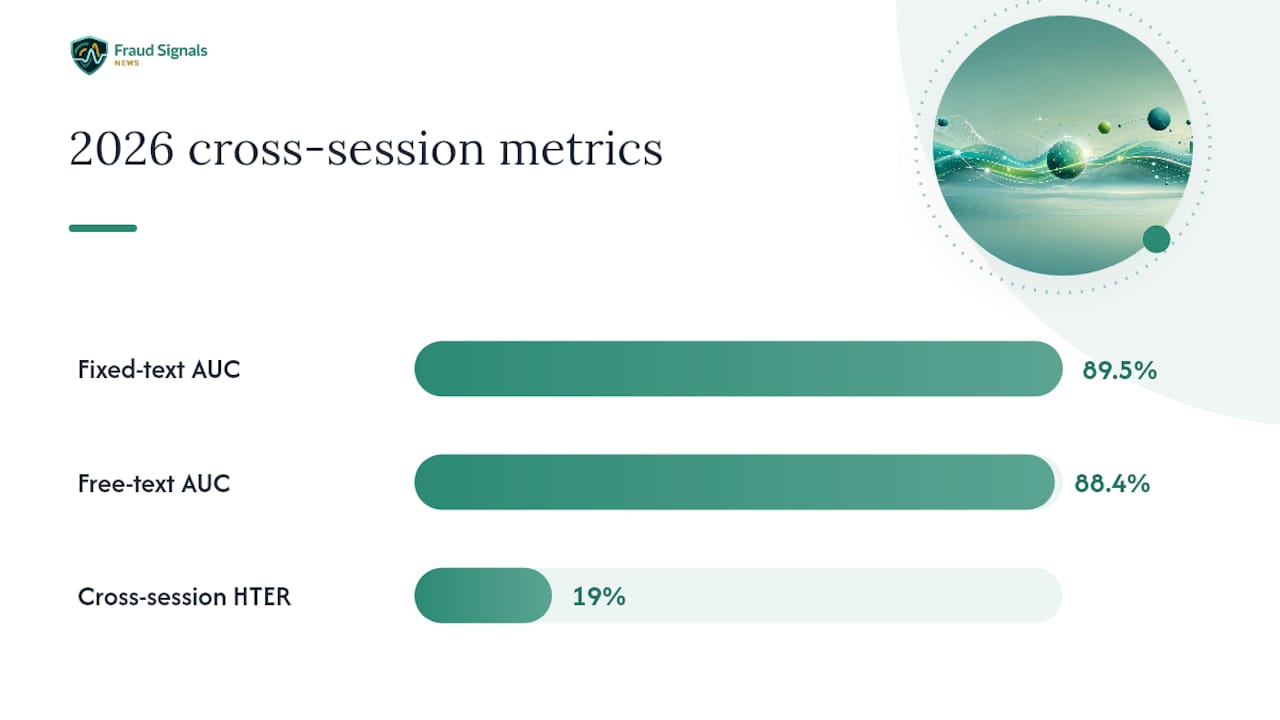
A 2026 cross-session evaluation of a client-side continuous authentication pipeline found fixed-text AUC averaging around 0.895 and free-text around 0.884, with HTER climbing to roughly 0.19 once thresholds calibrated on one session got applied to a later one. The models separate genuine from impostor typing well within a session; they get noticeably less reliable once you carry that threshold forward in time.
Static vs. Continuous Authentication: Choosing the Right Deployment Mode
Static and continuous modes solve different problems, and picking the wrong one wastes the effort of building a keystroke profile in the first place.
- Static (login-only) authentication checks a typing sample once, typically as a second factor alongside a password, and its goal is stopping credential stuffing and shoulder-surfing at the point of entry.
- Continuous authentication keeps scoring typing behavior throughout a session, aiming to catch account takeover after login, when a session token or cookie has already been hijacked.
- Practical use cases split along that line: password hardening and recovery flows lean on static checks, while banking session monitoring, exam-integrity platforms, and insider-threat detection lean on continuous scoring.
- Mobile and desktop deployments need separate handling, since typing position, on-screen keyboard behavior, and available sensor telemetry differ enough that mixing the two degrades accuracy.
- Continuous monitoring raises consent questions that static login checks mostly avoid; users should know their ongoing typing behavior is being scored, and retention policies should reflect that.
Fintech platforms and banks increasingly lean on the continuous mode to catch account takeover in the minutes after a session begins, rather than relying solely on a one-time login check that a stolen session cookie can bypass entirely.
What Limits Keystroke Dynamics Accuracy, and How Do Attackers Exploit It?
Typing rhythm is not a fixed trait. Stress, fatigue, illness, and even a new keyboard can shift someone’s timing signature enough to trip a poorly calibrated system. Language adds another layer of instability: bilingual users generally need separate profiles per language, because a profile trained on typing in one language will often reject the same person typing in another language.
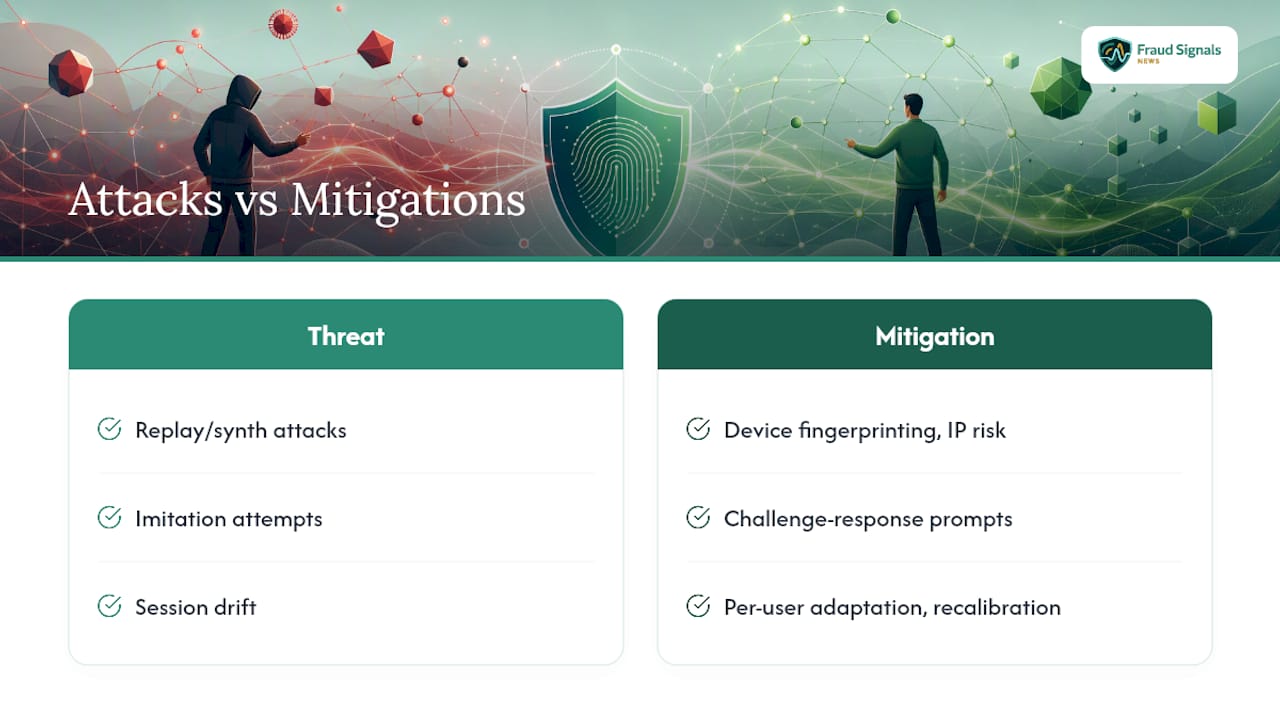
Session drift compounds the problem. A threshold that separates genuine from impostor samples cleanly in session one can produce a much higher error rate by session three, which is why global fixed thresholds tend to be fragile in production. Per-user adaptive scoring or periodic recalibration is generally necessary to keep error rates stable over time.
On the attack side, replayed or synthesized keystroke sequences and deliberate imitation attempts are the main threats. Mitigations include fusing keystroke signals with other passive telemetry (device fingerprinting, IP risk scoring), adding challenge-response prompts at high-risk moments, and layering in anomaly detection that flags sudden behavioral shifts rather than trusting a single static score.
Pro Tip: Don’t treat a single global EER as a promise. Test your model’s threshold across multiple sessions separated by days, not minutes, before trusting it in production.
How Do You Build a Production-Ready Keystroke Dynamics Pilot?
A pilot that skips evaluation discipline will look great in a demo and fall apart in the field. Follow a checklist that mirrors how researchers actually test these systems:
- Set enrollment policy first. Decide between same-text (30 to 40 characters) and any-text (120 to 200 characters) enrollment based on whether you’re hardening a login or monitoring a session, and enroll desktop and mobile separately.
- Run strict cross-session testing. Evaluate on a held-out later session (commonly labeled S2 in the literature), not just a held-out slice of the enrollment session, and benchmark against public datasets like Killourhy & Maxion or KeyRecs before trusting your own numbers.
- Monitor EER and AUC trends over time, not just at launch, since both metrics tend to drift as user populations and devices change.
- Build a retraining cadence. Periodic template updates recover accuracy lost to drift; a static template frozen at enrollment is a static template slowly going stale.
- Document consent and retention policy before collecting a single keystroke, since behavioral biometric data carries the same sensitivity as any other biometric identifier under most privacy frameworks.
Pro Tip: Budget for per-user threshold calibration from day one. Teams that launch with one global threshold almost always end up rebuilding the scoring layer within two quarters once false-positive complaints pile up.
Where Keystroke Dynamics Fits in the Bigger Identity Verification Picture
covers biometric authentication because the gap between lab benchmarks and production reliability is exactly where fraud teams get burned. Keystroke dynamics earns its place as a low-cost, continuous signal, not a standalone verdict. Start by reproducing a public benchmark, pilot continuous scoring on a low-risk flow, and pair it with other passive signals for real assurance. For deployment-specific detail on fraud prevention frameworks, see our biometrics coverage and fintech fraud reporting.
— Carlos Ochoa
Sources
- A Survey of Keystroke Dynamics Biometrics – PMC
- Authentication by Keystroke Dynamics: The Influence of Typing Language
- API Documentation – TypingDNA
FAQ
What Are Keystroke Biometrics?
Keystroke biometrics measure the timing pattern of how someone types, capturing dwell time, flight time, and digraph rhythm to verify identity without any extra hardware, as documented in the PMC survey on keystroke dynamics.
What Are the Four Types of Biometrics?
Biometric authentication generally splits into physiological types (fingerprint, iris, face), behavioral types (keystroke dynamics, gait, signature), voice-based methods, and multimodal systems that combine several of the above for higher assurance.
How Do I Turn on Biometric Fingerprint Authentication?
Fingerprint authentication is enabled through your device’s operating system settings, typically under Security or Biometrics, and is a separate hardware-based method from software-only keystroke dynamics.
What Is the Best Biometric Authentication Method?
No single method wins across every scenario. Fingerprint and face recognition offer strong one-time login assurance, while keystroke dynamics adds continuous, passive verification during a session; combining modalities through DAON or similar multimodal platforms tends to outperform any single method alone.
When Should I Use Keystroke Dynamics Instead of Other Biometric Modalities?
Keystroke dynamics fits best when you need a low-cost, passive signal for password hardening or ongoing session monitoring without deploying extra hardware; pair it with device or IP-based signals when a use case demands higher assurance than typing rhythm alone can provide.
Recommended

Detect SIM Swap Fraud Before Takeover: 3 Real Time Signals for Fraud Teams
21 Day Pilot: Layer Behavioral and Physical Biometrics for Fraud Teams